
Service Mesh: Linkerd
개요
- Website / GitHub
- 쿠버네티스 전용 서비스 메시 — CNCF Graduated Project
- Apache License 2.0
- 애플리케이션 변경 없이 런타임 디버깅, 관찰 가능성, 안정성, 보안을 플랫폼 수준에서 제공
- 각 서비스 인스턴스 옆에 초경량 투명 프록시(Linkerd2-proxy)를 사이드카로 배포
- Envoy 대신 Rust로 작성된 Linkerd2-proxy 사용 — 이유: 더 가볍고, 단순하고, 안전하게
| 특징 | 설명 |
|---|---|
| 초경량 프록시 | Rust로 작성된 Linkerd2-proxy — Envoy 대비 메모리·CPU 사용량 대폭 절감 |
| 자동 mTLS | 모든 TCP 트래픽에 대해 상호 TLS 자동 적용, 인증서 자동 교체 |
| Golden Metrics 자동화 | 성공률·트래픽·지연 시간(P50/P95/P99)을 코드 변경 없이 수집 |
| EWMA 로드 밸런싱 | 최소 대기 시간 엔드포인트로 자동 라우팅 |
| 자동 프록시 주입 | namespace/pod annotation으로 사이드카 자동 삽입 |
| 서비스 프로필 | 경로별 메트릭·재시도·타임아웃 CRD 기반 설정 |
| 트래픽 분할 | SMI TrafficSplit으로 카나리·블루/그린 배포 지원 |
| 멀티 클러스터 | 서비스 미러링으로 클러스터 간 투명한 통신 |
설치/업그레이드/삭제
- Linkerd
- CLI 설치/업그레이드
curl --proto '=https' --tlsv1.2 -sSfL https://run.linkerd.io/install | sh
- 환경 변수 적용
export PATH=$PATH:$HOME/.linkerd2/bin
- CLI 설치 확인(버전 확인)
linkerd version
- 쿠버네티스 클러스터 검증
linkerd check --pre
- Linkerd CNI plugin 설치
linkerd install-cni | kubectl apply -f -- 데이터 플레인에만 설치되므로 컨트롤 플레인에서의 서비스 메시가 필요하다면 tolerations을 추가해서 설치
- 업그레이드
linkerd install-cni | kubectl apply --prune -l linkerd.io/cni-resource=true -f -
- 컨트롤 플레인 설치
linkerd install --linkerd-cni-enabled | kubectl apply -f -- 업그레이드
linkerd upgrade | kubectl apply --prune -l linkerd.io/control-plane-ns=linkerd -f -
- 데이터 플레인 업그레이드
kubectl -n ${namespace} rollout restart deployments
- 설치 확인
linkerd check
- 삭제
linkerd uninstall | kubectl delete -f -linkerd install-cni | kubectl delete -f -
- CLI 설치/업그레이드
- Linkerd-Jaeger
- 설치/업그레이드
linkerd jaeger install | kubectl apply -f -
- 설치 확인
linkerd jaeger check
- 화면 실행
linkerd jaeger dashboard --address 0.0.0.0
- 삭제
linkerd jaeger uninstall | kubectl delete -f -
- 설치/업그레이드
- metric stack and dashboard
- yaml 생성/업그레이드
- Jaeger 사용
linkerd viz install --set jaegerUrl=${ip}:16686 > linkerd-viz.yaml
- Jaeger 미사용
linkerd viz install > linkerd-viz.yaml
- Jaeger 사용
- yaml 수정
- -enforced-host=.*
- 설치
kubectl apply -f linkerd-viz.yaml
- 설치 확인
linkerd check
- 화면 실행
linkerd viz dashboard --address 0.0.0.0
- 삭제
linkerd viz uninstall | kubectl delete -f -
- yaml 생성/업그레이드
기능/작업
- 프록시
- 모든 TCP 연결에 대해 프록시 가능
- 프록시 및 프로토콜 감지
- HTTP, HTTP/2로 감지하면 HTTP 수준 메트릭 및 라우팅 제공
- HTTP, HTTP/2로 감지하지 못하면 mTLS 적용 및 바이트 수준 메트릭 제공
- 파드가 HTTPS 호출을 하는 경우 TCP로 프록시
- 클라이언트가 TLS 연결을 시작하므로 해독 불가능
- 프로토콜 감지 구성
- 경우에 따라 클라이언트의 바이트를 볼 수 없기 때문에 10초의 프로토콜 감지 지연 후 TCP로 프록시
- 서버가 먼저 데이터를 보내거나(SMTP) 데이터를 보내지 않고 사전 연결하는 경우(Memcache) 등
- 지연 방지 방안
- 불투명한 포트
- 프로토콜 감지를 건너뛰고 TCP로 프록시
- annotation
config.linkerd.io/opaque-ports- 여러 포트를 쉼표로 구분된 문자열로 제공 가능
- 포트 건너뛰기
- 프록시를 완전히 우회
- annotation
config.linkerd.io/skip-outbound-ports- 들어오는 연결에 대해 우회는 skip-inbound-ports(일반적으로 디버깅 목적으로만 필요)
- 여러 포트를 쉼표로 구분된 문자열로 제공 가능
- 불투명한 포트
- 불투명 포트가 mTLS, 메트릭, 정책 등을 적용할 수 있으므로 선호
- 기본 불투명 포트 목록
- 25 (SMTP)
- 87 (SMTP)
- 3306 (MySQL)
- 4444 (Galera)
- 5432 (Postgres)
- 6379 (Redis)
- 9300 (ElasticSearch)
- 11211 (Memcache)
- 경우에 따라 클라이언트의 바이트를 볼 수 없기 때문에 10초의 프로토콜 감지 지연 후 TCP로 프록시
- mTLS(mutual TLS)
- 클라이언트도 인증된다는 추가 규정이 있는 regular TLS
- TLS는 기본적으로 한 방향으로만 인증
- 클라이언트는 서버를 인증하지만 서버는 클라이언트를 인증하지 않음
- 모든 TCP 트래픽에 대해 자동으로 활성화
- 비 mTLS 트래픽
- 메시가 아닌 파드로 들어오거나 나가는 트래픽
- 포트 건너뛰기가 설정된 포트의 트래픽
- 운영 문제
- 트러스트 앵커
linkerd install로 생생된 트러스트 앵커는 1년 후 만료되며 수동으로 교체해야 함
- 컨트롤 플레인 TLS 자격 증명
- 데이터 플레인 프록시에 대한 TLS 인증서는 24시간 후에 만료되며 자동으로 교체
- 인증서를 발급하는데 사용되는 TLS 자격 증명은 교체되지 않음
- 웹훅 TLS 자격 증명
- Linkerd 컨트롤 플레인에는 Kubernetes 자체에서 직접 호출하는 webhook이라는 여러 구성 요소
- Kubernetes에서 Linkerd 웹훅으로의 트래픽은 TLS로 보호되므로 각 웹훅에는 TLS 자격 증명이 포함된 시크릿 필요
- 기본적으로 Linkerd가 Linkerd CLI 또는 Linkerd Helm 차트와 함께 설치되면 모든 웹훅에 대해 TLS 자격 증명이 자동으로 생성
- 인증서가 만료되거나 어떤 이유로든 재생성해야 하는 경우 Linkerd 업그레이드 (Linkerd CLI 사용 또는 Helm 사용)를(웹훅 인증서 순환) 수행하면 인증서가 재생성
- 정기적으로 자동 교체해야하는 경우 Webhook TLS 자격 증명 자동 교체 참조
- 트러스트 앵커
- 인그레스
- 단순성을 위해 자체 수신 컨트롤러는 제공하지 않음
- 수신 컨트롤러와 함꼐 작동되도록 설계
- 컨트롤러 별 설정 방법
- 원격 측정 및 모니터링
- 애플리케이션 변경 없이 자동으로 작동
- HTTP, HTTP/2, gRPC 트래픽에 대한 golden 메트릭 기록
- TCP 트래픽에 대한 TCP 수준 메트릭(바이트 입/출력 등) 기록
- 서비스 당, 송/수신자 당, route/path 당 메트릭 보고
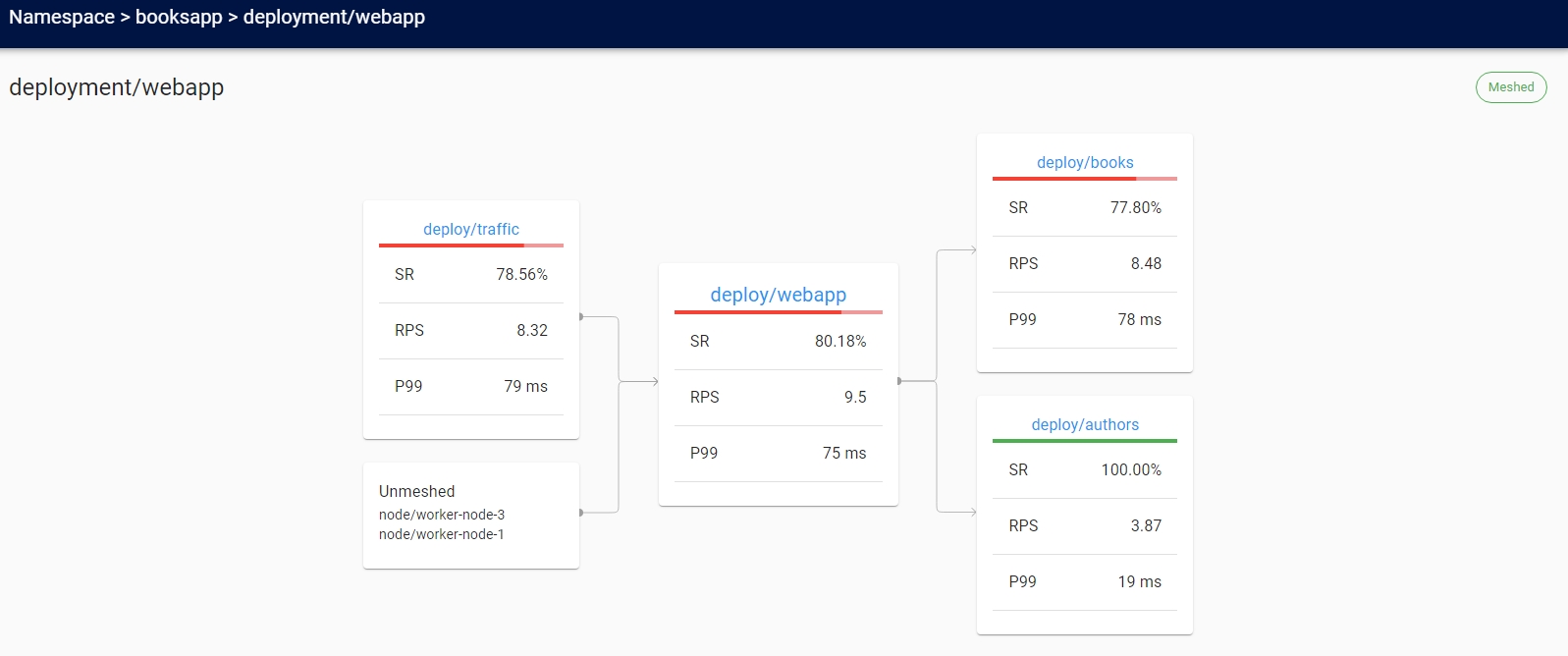
- 서비스 간의 런타임 관계를 표시하는 토폴로지 그래프 생성
- golden 메트릭
- 성공률
- 일정 기간(기본값은 1분) 동안 성공한 요청의 비율
- 트래픽
- 시간 당 요청
- 대기 시간
- 50번째, 95번째 및 99번째 백분위수로 분할
- 낮은 백분위수는 시스템의 평균 성능에 대한 개요를 제공
- 꼬리 백분위수는 이상값 동작을 포착하는 데 도움
- 성공률
- 메트릭의 수명
- 6시간
- 장기보관이 필요한 경우 매트릭 내보내기를 통해 다른 저장소로 내보내야 함
- 로드 밸런싱
- 구성할 필요없이 모든 목적지 엔드포인트에서 요청을 자동으로 로드 밸런싱
- EWMA(Exponentially Weighted Moving Average)를 사용하여 가장 빠른 엔드포인트에 자동으로 요청 전송
- Kubernetes에 없는 대상의 경우 DNS에서 제공하는 엔드포인트 간에 균형을 유지
- Kubernetes에 있는 대상의 경우 Kubernetes API에서 IP 주소를 조회
- IP 주소가 서비스에 해당하는 경우 해당 서비스의 엔드포인트에 걸쳐 로드 밸랜싱 수행
- IP 주소가 Pod에 해당하는 경우 로드 밸런싱 하지 않음
- 헤드리스 서비스로 작업하는 경우 서비스의 끝점을 검색이 불가하므로 로드 밸런싱 하지 않음
- Kubernetes의 기본 부하 분산이 효과적이지 않은 Kubernetes의 gRPC(또는 HTTP/2) 서비스에 특히 유용
- 승인 정책
- 메시 파드에 허용되는 트래픽 유형 제어 가능
- HTTP, HTTP/2, gRPC가 정책에 의해 거부되면 프록시는 403 반환
- HTTP가 아닌 트래픽은 TCP 수준에서 연결 거부
- 자동 프록시 주입
linkerd.io/inject: enabledannotations이 namespace 혹은 deployments 혹은 pod와 같은 워크로드에 있을때 프록시를 파드에 자동으로 추가- 비활성화
linkerd.io/inject: disabled
- yaml 파일에 주석 추가
- 추가 후 기동
cat deployment.yml | linkerd inject - | kubectl apply -f -
- 추가 된 yaml 저장
cat xxx.yaml | linkerd inject - > xxx-inject.yaml
- 추가 후 기동
- 기동중인 deployments에 주입하여 재기동
kubectl get deployments -n ${namespace} | linkerd inject - | kubectl apply -f -- deployments를 statefulsets등으로 변경하면 다른 kind에 적용 가능
- 확인
kubectl -n ${namespace} get pod -o jsonpath='{.items[*].spec.containers[*].name}'- 프록시가 주입된 컨테이너 출력
- CNI 플러그인
- 기본적으로는 파드 시작 시 초기화 컨테이너에서 iptables를 사용하여 파드에 대한 라우팅 규칙을 설치
- 이를 위해선 CAP_NET_ADMIN capabilities 필요
- 초기화 컨테이너 대신 CNI 플러그인을 이용하여 iptables 규칙을 실행할 수 있고 CAP_NET_ADMIN capabilities가 필요하지 않음
- CNI 체인을 사용하여 기존 CNI 플러그인과 함께 실행되도록 설계
- Linkerd 관련 구성만 처리
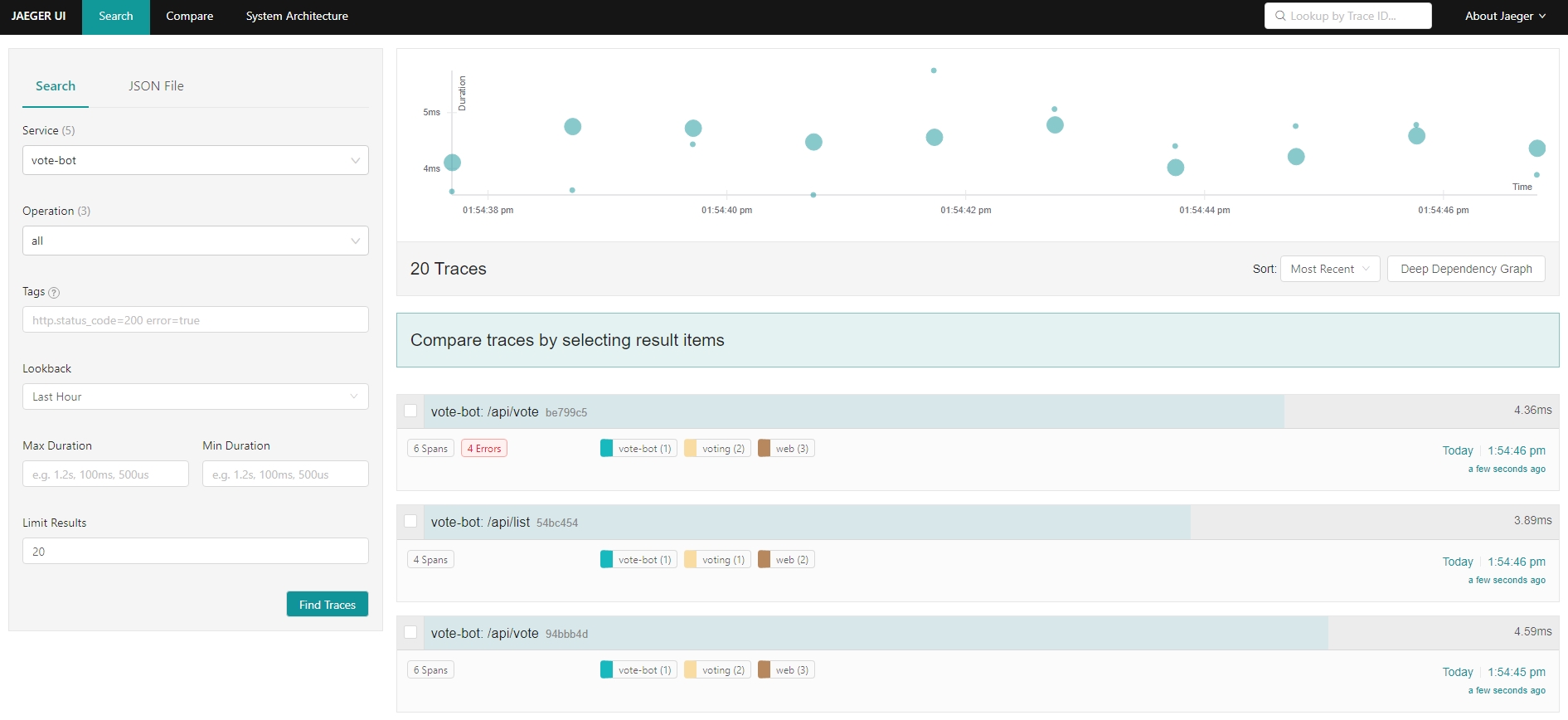
- 분산 추적
- 병목 현상을 식별하고 시스템의 각 구성 요소에 대한 대기 시간 비용을 이해하기 위해 분산 시스템 성능을 디버깅하는 데 매우 중요한 도구
- 분산 추적에는 코드 변경과 구성이 모두 필요
- 애플리케이션 변경 없이 제공하는 분산 추적 기능
- 라이브 서비스 토폴로지 및 종속성 그래프
- 집계된 서비스 상태, 지연 시간 및 요청 볼륨
- 집계된 route/path 상태, 지연 시간 및 요청 볼륨
- 예제
- 애플리케이션
linkerd inject https://run.linkerd.io/emojivoto.yml | kubectl apply -f -kubectl -n emojivoto set env --all deploy OC_AGENT_HOST=collector.linkerd-jaeger:55678
- 대시보드
- 애플리케이션
- 외부 Jaeger
- Linkerd-Jaeger collector가 외부 Jaeger collector에 전송하는 방식
vim linkerd-jaeger-add.yaml
        jaeger:
          enabled: false

        collector:
          config: |
            receivers:
              otlp:
                protocols:
                  grpc:
                  http:
              opencensus:
              zipkin:
              jaeger:
                protocols:
                  grpc:
                  thrift_http:
                  thrift_compact:
                  thrift_binary:
            processors:
              batch:
            extensions:
              health_check:
            exporters:
              jaeger:
                endpoint: my-jaeger-collector.my-jaeger-ns:14250
                insecure: true
            service:
              extensions: [health_check]
              pipelines:
                traces:
                  receivers: [otlp,opencensus,zipkin,jaeger]
                  processors: [batch]
                  exporters: [jaeger]
- `linkerd jaeger install --values ./linkerd-jaeger-add.yaml | kubectl apply -f -`
- 결함 주입
- 서비스의 오류율을 인위적으로 증가시켜 시스템 전체에 어떤 영향을 미치는지 확인하는 카오스 엔지니어링의 한 형태
- 서비스 코드 변경 없이 수행 가능
- 고가용성(High Availability)
- 프로덕션 환경을 위해 HA 모드 지원
- 중요 컨트롤 플레인 구성 요소에 대해 3개의 복제본을 유지
- 컨트롤 플레인 구성 요소에서 CPU/MEMORY 리소스 요청 설정
- 데이터 플레인 프록시에서 CPU/MEMORY 리소스 요청 설정
- anti-affinity 정책을 설정하여 서로 다른 노드에 파드를 스케쥴
- 노드가 3개 이상 있다고 가정
- 활성화
- 설치
linkerd install --ha | kubectl apply -f -linkerd viz install --ha | kubectl apply -f -
- 복제본 수 재정의 설치
linkerd install --ha --controller-replicas=2 | kubectl apply -f -
- 업그레이드
linkerd upgrade --ha | kubectl apply -f -linkerd viz install --ha | kubectl apply -f -
- 설치
- install CLI documentation
- Kubernetes 권장 사항에 의해 kube-system 네임스페이스에 대해 프록시 인젝터를 비활성화해야 함
kubectl label namespace kube-system config.linkerd.io/admission-webhooks=disabled
- Prometheus
- 프로덕션 환경에서는 Linkerd가 제공하는 Prometheus가 아닌 자체 Prometheus 사용을 권장
- Cluster AutoScaler
- Linkerd 프록시는 mTLS 개인 키를 tmpfs emptyDir 볼륨에 저장하여 이 정보가 포드를 떠나지 않도록 함
- 이로 인해 Cluster AutoScaler의 기본 설정은 워크로드 복제본이 주입된 노드를 축소 불가
- 해결 방법
- 주입된 워크로드에 주석을 추가
cluster-autoscaler.kubernetes.io/safe-to-evict: "true"
- Cluster AutoScaler 구성을 완전히 제어할 수 있는 경우
--skip-nodes-with-local-storage=false옵션으로 Cluster AutoScaler를 시작
- 주입된 워크로드에 주석을 추가
- 멀티 클러스터 통신
- 기능
- 통합 트러스트 도메인
- 소스 및 대상 워크로드의 ID는 클러스터 경계 안팎의 모든 단계에서 검증
- 장애 도메인 분리
- 이기종 네트워크 지원
- 게이트웨이 연결 이외의 L3/L4 요구 사항을 도입하지 않음
- 클러스터 내 통신과 함께하는 통합 모델
- 클러스터 내 통신에 제공하는 것과 동일한 관찰 가능성, 안정성 및 보안 기능이 클러스터 간 통신으로 확장
- 통합 트러스트 도메인
- 동작 원리
- 클러스터 간의 서비스 정보를 “미러링”하여 동작
- 원격 서비스는 Kubernetes 서비스로 표현되기 때문에 Linkerd의 전체 관찰 가능성, 보안 및 라우팅 기능은 클러스터 내 호출과 클러스터 호출 모두에 동일하게 적용
- 서비스 미러와 게이트웨이 구성 요소로 구현
- 아키텍쳐 (서비스 미러링 + 게이트웨이 구성)
- 서비스 미러
- 대상 클러스터에서 서비스 업데이트를 감시하고 해당 서비스 업데이트를 소스 클러스터에서 로컬로 미러링
- 애플리케이션이 직접 주소를 지정할 수 있도록 대상 클러스터의 서비스 이름에 대한 가시성 제공
- 게이트웨이
- 대상 클러스터에 소스 클러스터의 요청을 수신하는 방법을 제공
- 기능
- 서비스 프로필
- 서비스에 대한 추가 정보와 서비스 요청을 처리하는 방법을 제공할 수 있는 CRD
- 경로 별 메트릭, 재시도 및 시간 초과와 같은 경로 별 기능 활성화
- 헤드리스 서비스의 경우 서비스 프로필 검색 불가능
- 대상 IP 주소를 기반으로 서비스 검색 정보를 읽는데 파드 IP 주소인 경우 파드가 속한 서비스를 알 수가 없음
- 작성 방법
- Swagger
linkerd profile --open-api webapp.swagger webapp
- Protobuf
linkerd profile --proto web.proto web-svc
- 자동 생성
- 일정시간 실시간으로 트래픽을 관찰하여 자동으로 서비스 프로필을 생성
linkerd viz profile -n emojivoto web-svc --tap deploy/web --tap-duration 10s
- 템플릿
linkerd profile -n emojivoto web-svc --template
- Swagger
            ### ServiceProfile for web-svc.emojivoto ###
            apiVersion: linkerd.io/v1alpha2
            kind: ServiceProfile
            metadata:
              name: web-svc.emojivoto.svc.cluster.local
              namespace: emojivoto
            spec:
              # A service profile defines a list of routes.  Linkerd can aggregate metrics
              # like request volume, latency, and success rate by route.
              routes:
              - name: '/authors/{id}'

                # Each route must define a condition.  All requests that match the
                # condition will be counted as belonging to that route.  If a request
                # matches more than one route, the first match wins.
                condition:
                  # The simplest condition is a path regular expression.
                  pathRegex: '/authors/\d+'

                  # This is a condition that checks the request method.
                  method: POST

                  # If more than one condition field is set, all of them must be satisfied.
                  # This is equivalent to using the 'all' condition:
                  # all:
                  # - pathRegex: '/authors/\d+'
                  # - method: POST

                  # Conditions can be combined using 'all', 'any', and 'not'.
                  # any:
                  # - all:
                  #   - method: POST
                  #   - pathRegex: '/authors/\d+'
                  # - all:
                  #   - not:
                  #       method: DELETE
                  #   - pathRegex: /info.txt

                # A route may be marked as retryable.  This indicates that requests to this
                # route are always safe to retry and will cause the proxy to retry failed
                # requests on this route whenever possible.
                # isRetryable: true

                # A route may optionally define a list of response classes which describe
                # how responses from this route will be classified.
                responseClasses:

                # Each response class must define a condition.  All responses from this
                # route that match the condition will be classified as this response class.
                - condition:
                    # The simplest condition is a HTTP status code range.
                    status:
                      min: 500
                      max: 599

                    # Specifying only one of min or max matches just that one status code.
                    # status:
                    #   min: 404 # This matches 404s only.

                    # Conditions can be combined using 'all', 'any', and 'not'.
                    # all:
                    # - status:
                    #     min: 500
                    #     max: 599
                    # - not:
                    #     status:
                    #       min: 503

                  # The response class defines whether responses should be counted as
                  # successes or failures.
                  isFailure: true

                # A route can define a request timeout.  Any requests to this route that
                # exceed the timeout will be canceled.  If unspecified, the default timeout
                # is '10s' (ten seconds).
                # timeout: 250ms

              # A service profile can also define a retry budget.  This specifies the
              # maximum total number of retries that should be sent to this service as a
              # ratio of the original request volume.
              # retryBudget:
              #   The retryRatio is the maximum ratio of retries requests to original
              #   requests.  A retryRatio of 0.2 means that retries may add at most an
              #   additional 20% to the request load.
              #   retryRatio: 0.2

              #   This is an allowance of retries per second in addition to those allowed
              #   by the retryRatio.  This allows retries to be performed, when the request
              #   rate is very low.
              #   minRetriesPerSecond: 10

              #   This duration indicates for how long requests should be considered for the
              #   purposes of calculating the retryRatio.  A higher value considers a larger
              #   window and therefore allows burstier retries.
              #   ttl: 10s
- 예제
- 애플리케이션
kubectl create ns booksapp && curl --proto '=https' --tlsv1.2 -sSfL https://run.linkerd.io/booksapp.yml | kubectl -n booksapp apply -f -kubectl get -n booksapp deploy -o yaml | linkerd inject - | kubectl apply -f -- topology
- 경로 별 메트릭
- 설정한 경로 별로 메트릭을 Prometheus가 수집
- 새벽에 문제가 발생하여도 출근 후에 문제 및 상황 인지 가능
- 서비스 프로필 생성
- webapp
curl --proto '=https' --tlsv1.2 -sSfL https://run.linkerd.io/booksapp/webapp.swagger | linkerd -n booksapp profile --open-api - webapp | kubectl -n booksapp apply -f -
- webapp
- 애플리케이션
                apiVersion: linkerd.io/v1alpha2
                kind: ServiceProfile
                metadata:
                  creationTimestamp: null
                  name: webapp.booksapp.svc.cluster.local
                  namespace: booksapp
                spec:
                  routes:
                  - condition:
                      method: GET
                      pathRegex: /
                    name: GET /
                  - condition:
                      method: POST
                      pathRegex: /authors
                    name: POST /authors
                  - condition:
                      method: GET
                      pathRegex: /authors/[^/]*
                    name: GET /authors/{id}
                  - condition:
                      method: POST
                      pathRegex: /authors/[^/]*/delete
                    name: POST /authors/{id}/delete
                  - condition:
                      method: POST
                      pathRegex: /authors/[^/]*/edit
                    name: POST /authors/{id}/edit
                  - condition:
                      method: POST
                      pathRegex: /books
                    name: POST /books
                  - condition:
                      method: GET
                      pathRegex: /books/[^/]*
                    name: GET /books/{id}
                  - condition:
                      method: POST
                      pathRegex: /books/[^/]*/delete
                    name: POST /books/{id}/delete
                  - condition:
                      method: POST
                      pathRegex: /books/[^/]*/edit
                    name: POST /books/{id}/edit
- authors
- `curl --proto '=https' --tlsv1.2 -sSfL https://run.linkerd.io/booksapp/authors.swagger | linkerd -n booksapp profile --open-api - authors | kubectl -n booksapp apply -f -`
- books
- `curl --proto '=https' --tlsv1.2 -sSfL https://run.linkerd.io/booksapp/books.swagger | linkerd -n booksapp profile --open-api - books | kubectl -n booksapp apply -f -`
- 대시보드
- 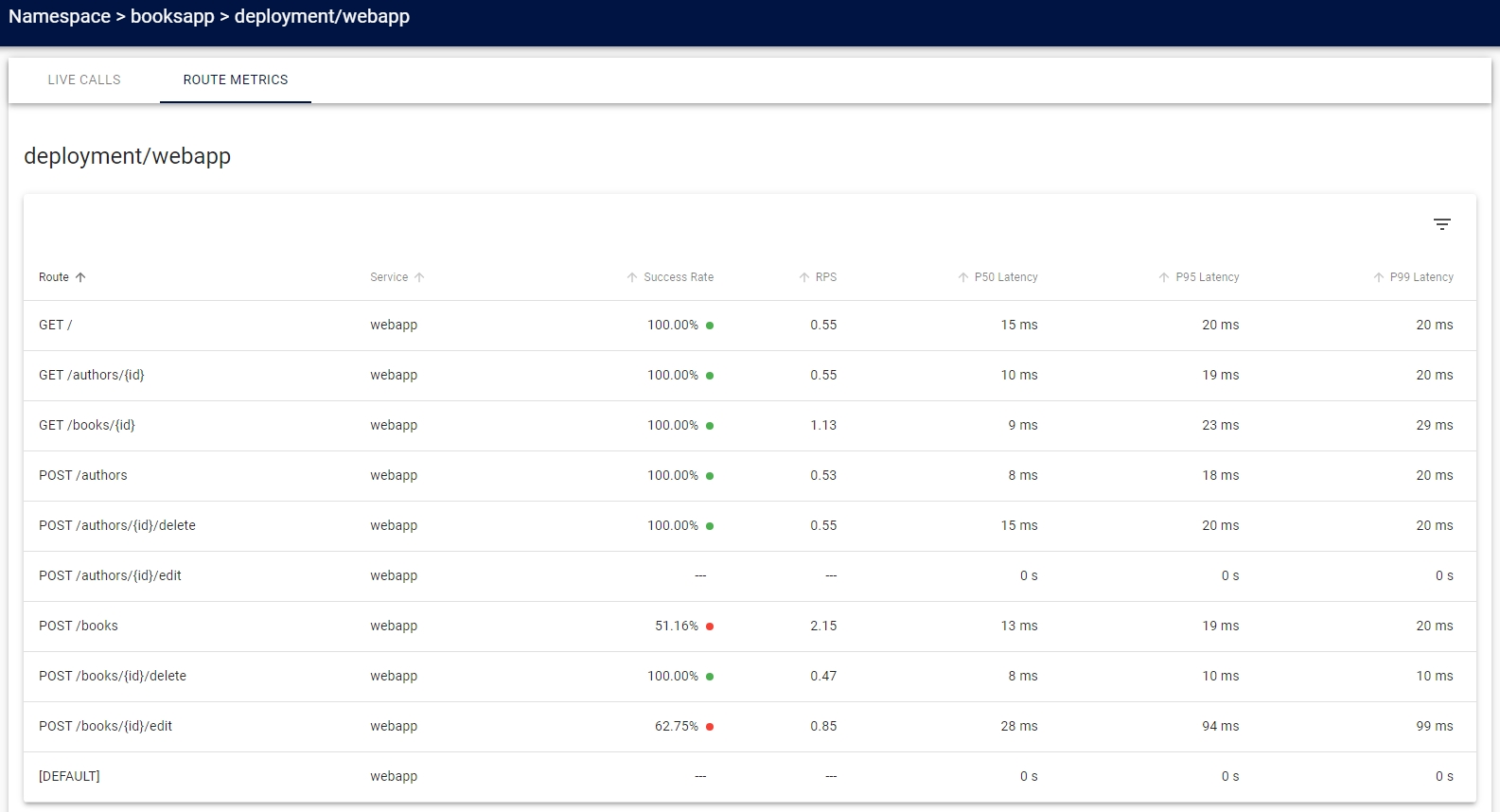{: #magnific}
- [DEFAULT]는 서비스 프로필과 일치하지 않는 모든 항목
- Prometheus
- 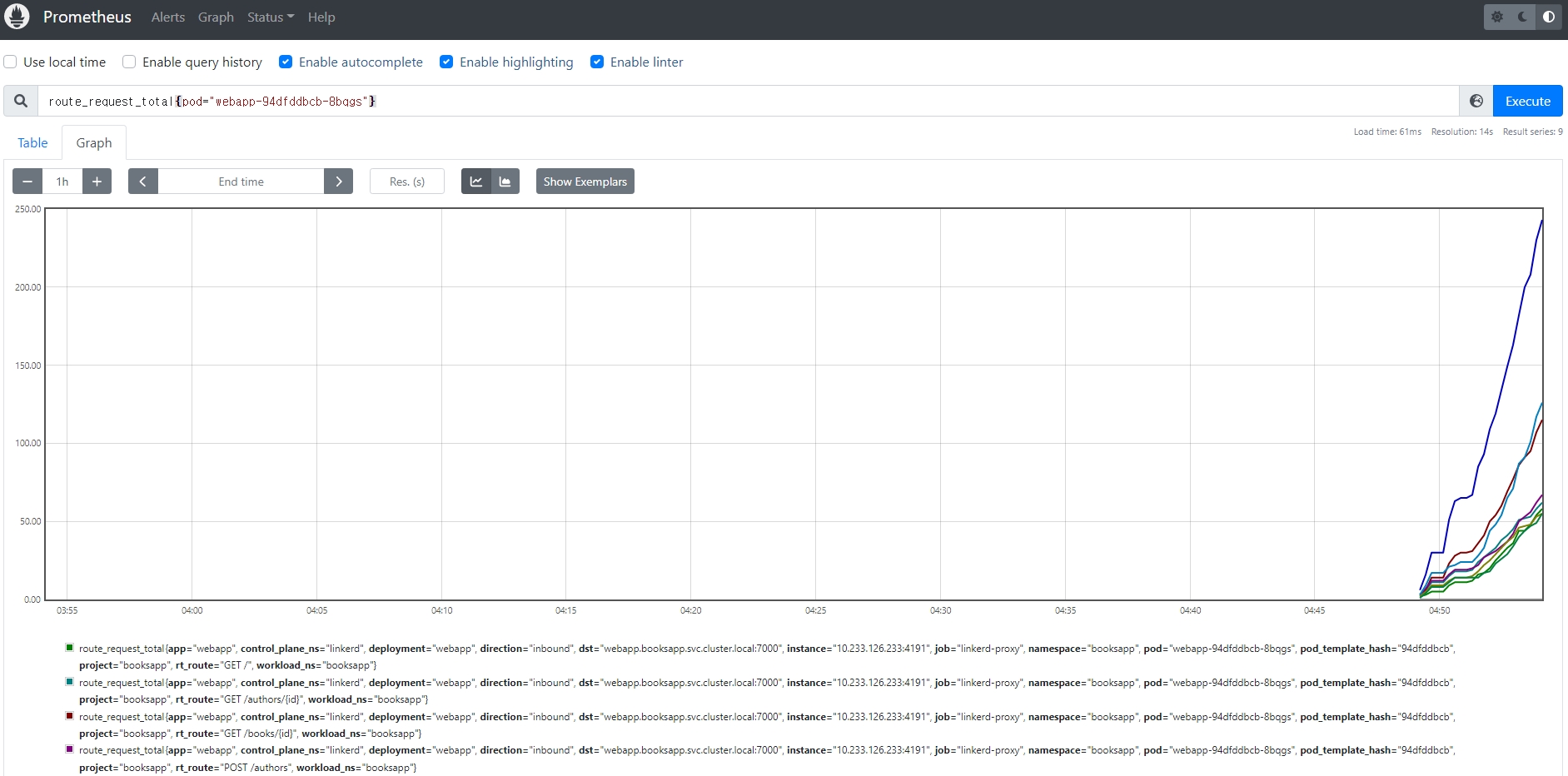{: #magnific}
- 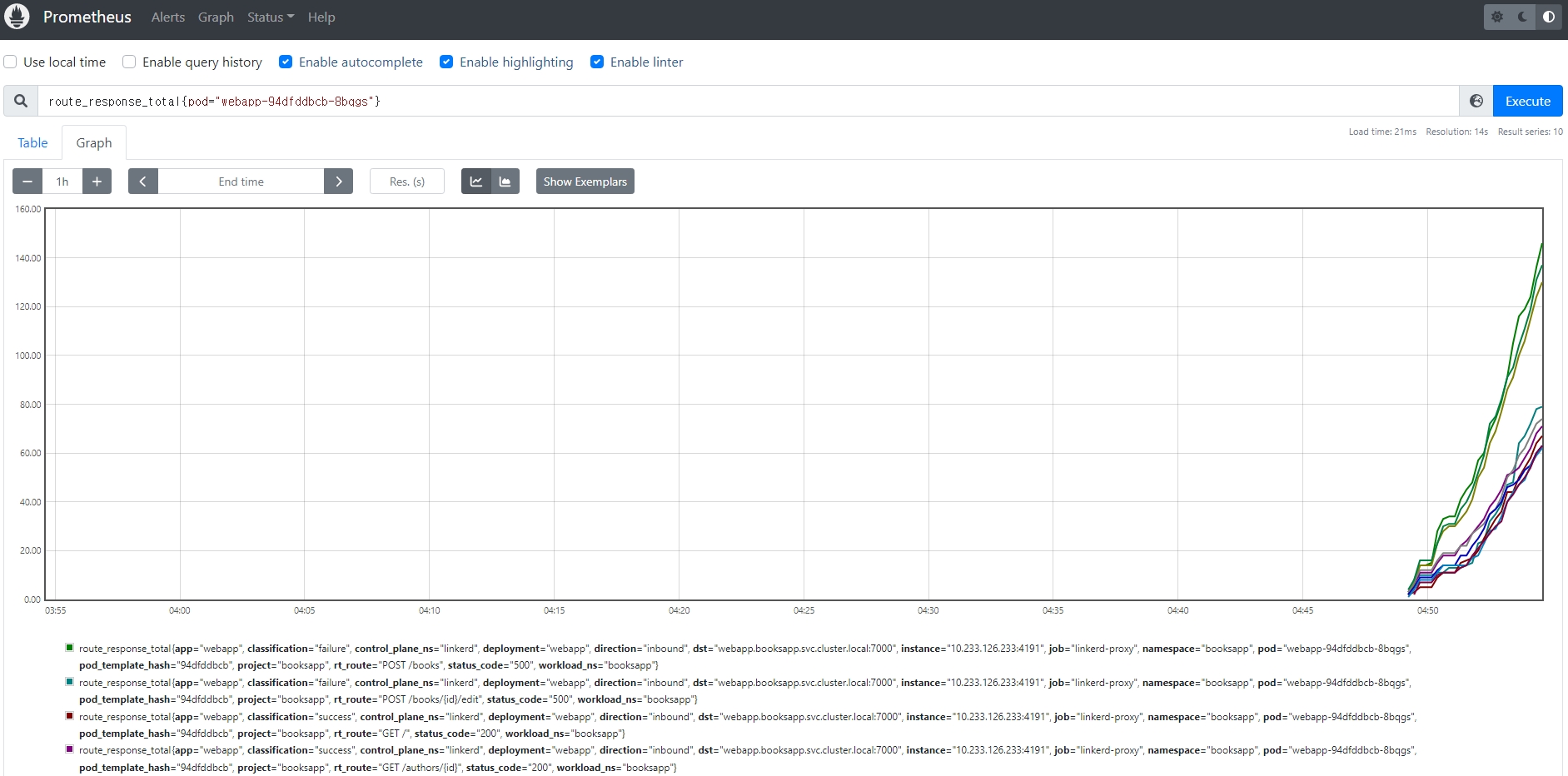{: #magnific}
- Grafana
- 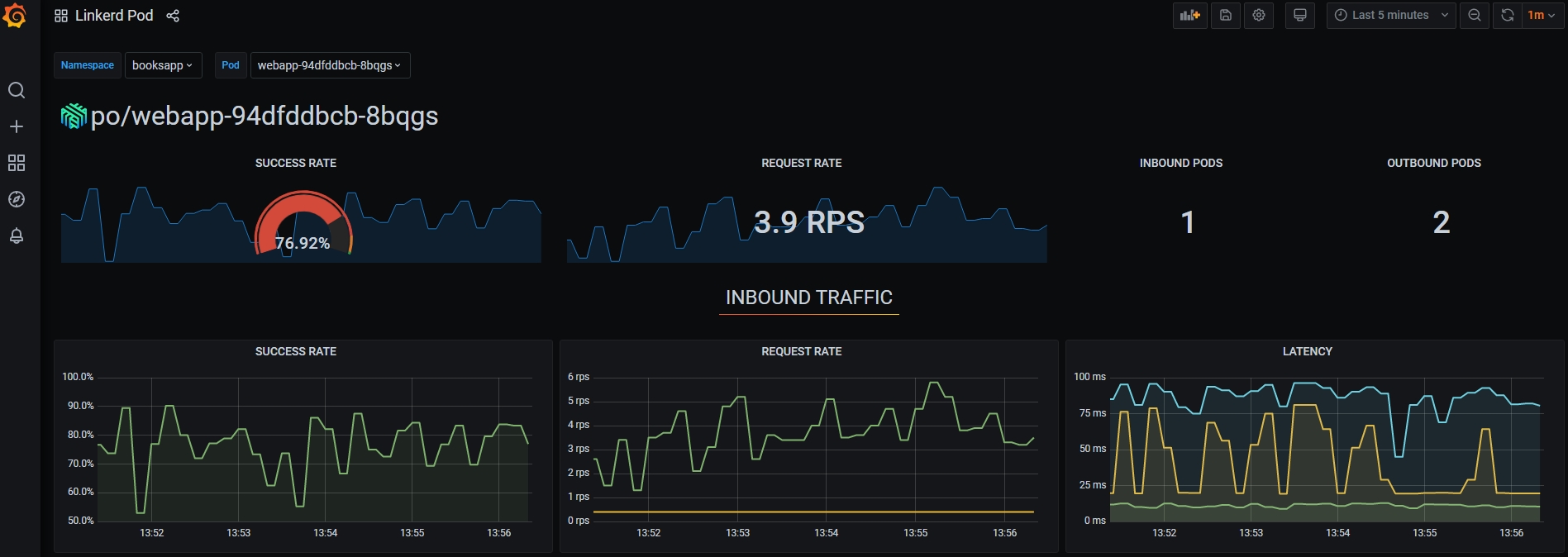{: #magnific}
- [재시도](https://linkerd.io/2.11/tasks/configuring-retries/)
- 설정 전 요청 성공률
- `linkerd viz -n booksapp routes deploy/books --to svc/authors`
- {: #magnific}
- 설정
- 해당 path의 condition에 `isRetryable: true` 추가
- `kubectl -n booksapp edit sp/authors.booksapp.svc.cluster.local`
                spec:
                  routes:
                  - condition:
                      method: HEAD
                      pathRegex: /authors/[^/]*\.json
                    name: HEAD /authors/{id}.json
                    isRetryable: true
- 설정 후 요청 성공률
- `linkerd viz -n booksapp routes deploy/books --to svc/authors`
- {: #magnific}
- [타임아웃](https://linkerd.io/2.11/tasks/configuring-timeouts/)
- 설정 전 성공률
- `linkerd viz -n booksapp routes deploy/webapp --to svc/books`
- {: #magnific}
- 설정
- 해당 path의 condition에 `timeout: ${time}` 추가
- `kubectl -n booksapp edit sp/books.booksapp.svc.cluster.local`
                spec:
                  routes:
                  - condition:
                      method: PUT
                      pathRegex: /books/[^/]*\.json
                    name: PUT /books/{id}.json
                    timeout: 10ms
- 설정 후 성공률
- `linkerd viz -n booksapp routes deploy/webapp --to svc/books`
- {: #magnific}
- Linkerd SMI
- SMI, Service Mesh Interface
- Kubernetes의 서비스 메시에 대한 표준 인터페이스
- 기본적으로 서비스 간에 트래픽 분할을 수행하는 데 사용할 수 있는 SMI의 TrafficSplit 사양을 지원
- 하지만 SMI는 서비스 메시 기능의 극히 일부이므로 특정 구성을 추가할 수 없다는 단점 존재
- Linkerd SMI는 이러한 문제를 해결하기 위해 SMI 사양을 이해하고 수행할 수 있는 리소스를 기본 Linkerd 리소스로 변환하는 어댑터를 지원
- SMI-Adaptor는 TrafficSplit 리소스를 감시하기 때문에 동일한 작업을 수행하기 위해 해당 ServiceProfile 리소스를 자동으로 생성
- 설치
- CLI
curl --proto '=https' --tlsv1.2 -sSfL https://linkerd.github.io/linkerd-smi/install | sh
- Linkerd SMI
linkerd smi install | kubectl apply -f -
- 확인
linkerd smi check
- 삭제
linkerd smi uninstall | kubectl delete -f -
- CLI
- SMI, Service Mesh Interface
- 트래픽 분할
- Kubernetes 서비스로 향하는 트래픽의 임의 부분을 다른 대상 서비스로 동적으로 이동
- 카나리, 블루/그린 배포와 같은 정교한 롤아웃 전략을 구현하는데 사용
- 헤드리스 서비스의 경우 트래픽 분할 검색 불가능
- 대상 IP 주소를 기반으로 서비스 검색 정보를 읽는데 파드 IP 주소인 경우 파드가 속한 서비스를 알 수가 없음
- SMI TrafficSplit API를 통해 제공
- 트래픽 분할을 원격 측정과 결합하면 이전 버전과 새 버전의 성공률과 대기 시간을 자동으로 고려
- 트래픽 분할 예제
- 네임스페이스 생성
kubectl create namespace trafficsplit-sample
- 예제 애플리케이션 실행
linkerd inject https://raw.githubusercontent.com/linkerd/linkerd2/main/test/integration/viz/trafficsplit/testdata/application.yaml | kubectl -n trafficsplit-sample apply -f -
- edges 확인
linkerd viz edges deploy -n trafficsplit-sample
- TrafficSplit 설정
- 네임스페이스 생성
            apiVersion: split.smi-spec.io/v1alpha2
            kind: TrafficSplit
            metadata:
              name: backend-split
              namespace: trafficsplit-sample
            spec:
              service: backend-svc
              backends:
              - service: backend-svc
                weight: 500
              - service: failing-svc
                weight: 500
- edges 확인
- `linkerd viz edges deploy -n trafficsplit-sample`
- {: #magnific}
- 대시보드
- 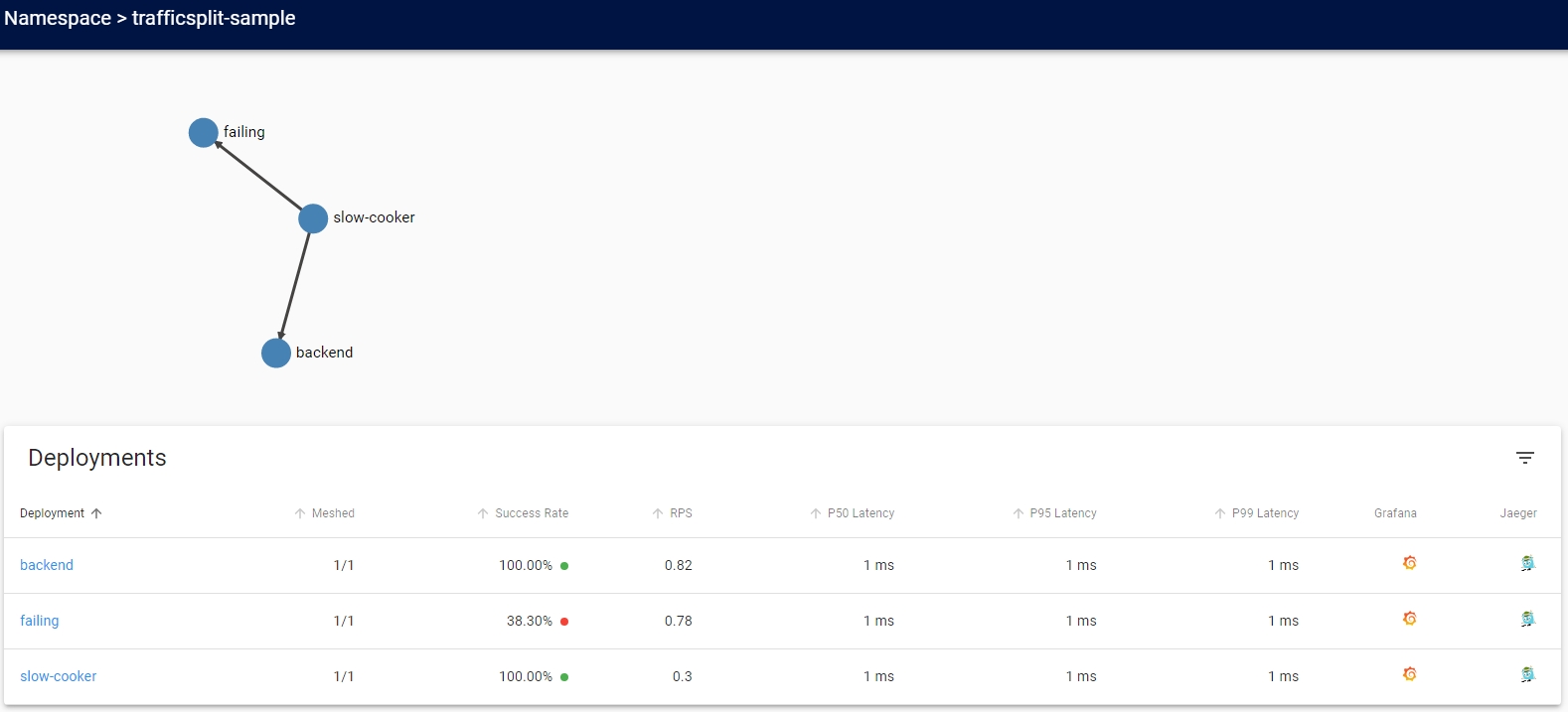{: #magnific}
- 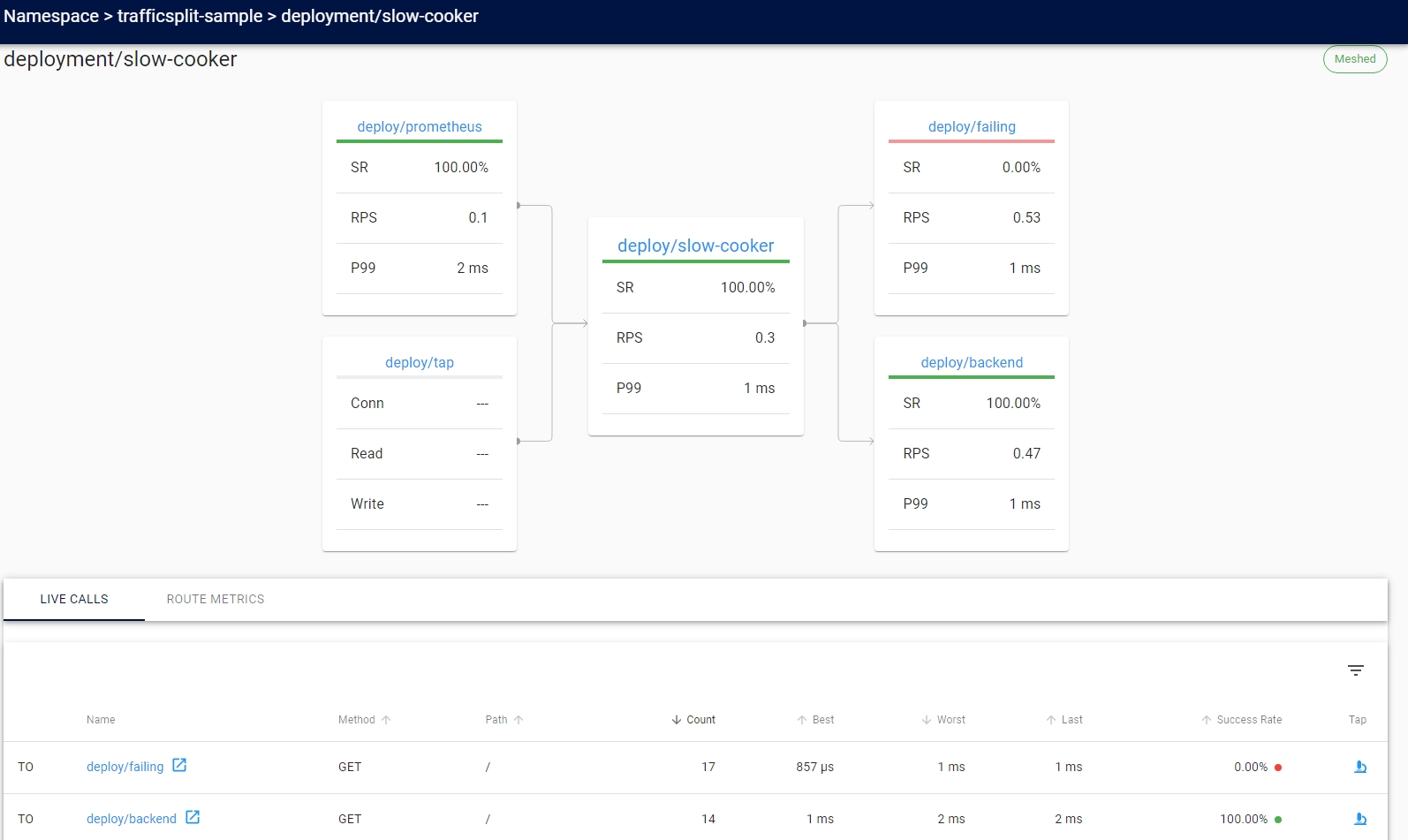{: #magnific}
- 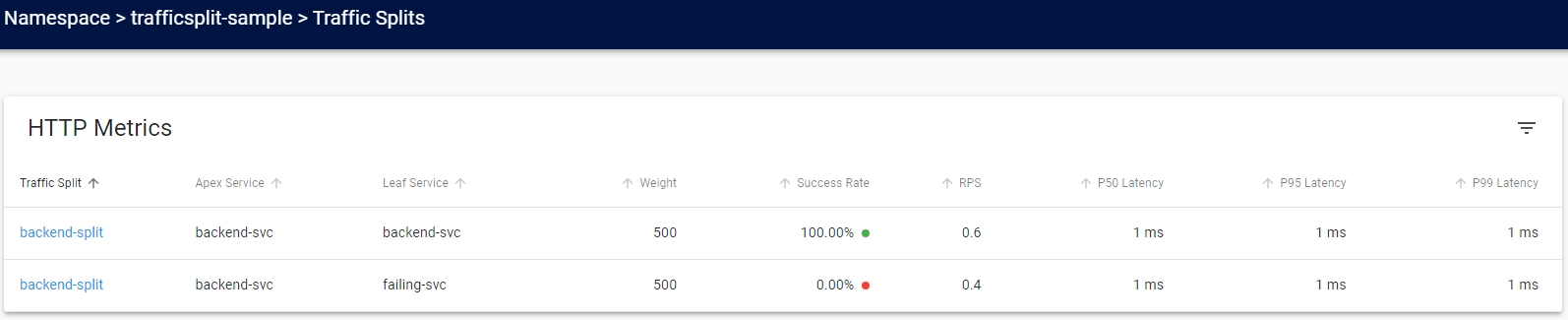{: #magnific}
- 삭제
- kubectl delete namespace/trafficsplit-sample
- 카나리 릴리스
- Flagger와 결합하여 제공
- 설치
- Linkerd SMI 설치
- Flagger 설치
kubectl apply -k github.com/fluxcd/flagger/kustomize/linkerd
- 삭제
- Linkerd SMI 삭제
- Flagger 삭제
kubectl delete -k github.com/fluxcd/flagger/kustomize/linkerd
- 예제
kubectl create ns test && kubectl apply -f https://run.linkerd.io/flagger.yml- 대시보드
- 대시보드
- 릴리스 설정
- 성공률이 99% 이상이면 가중치를 100까지 10씩 증가
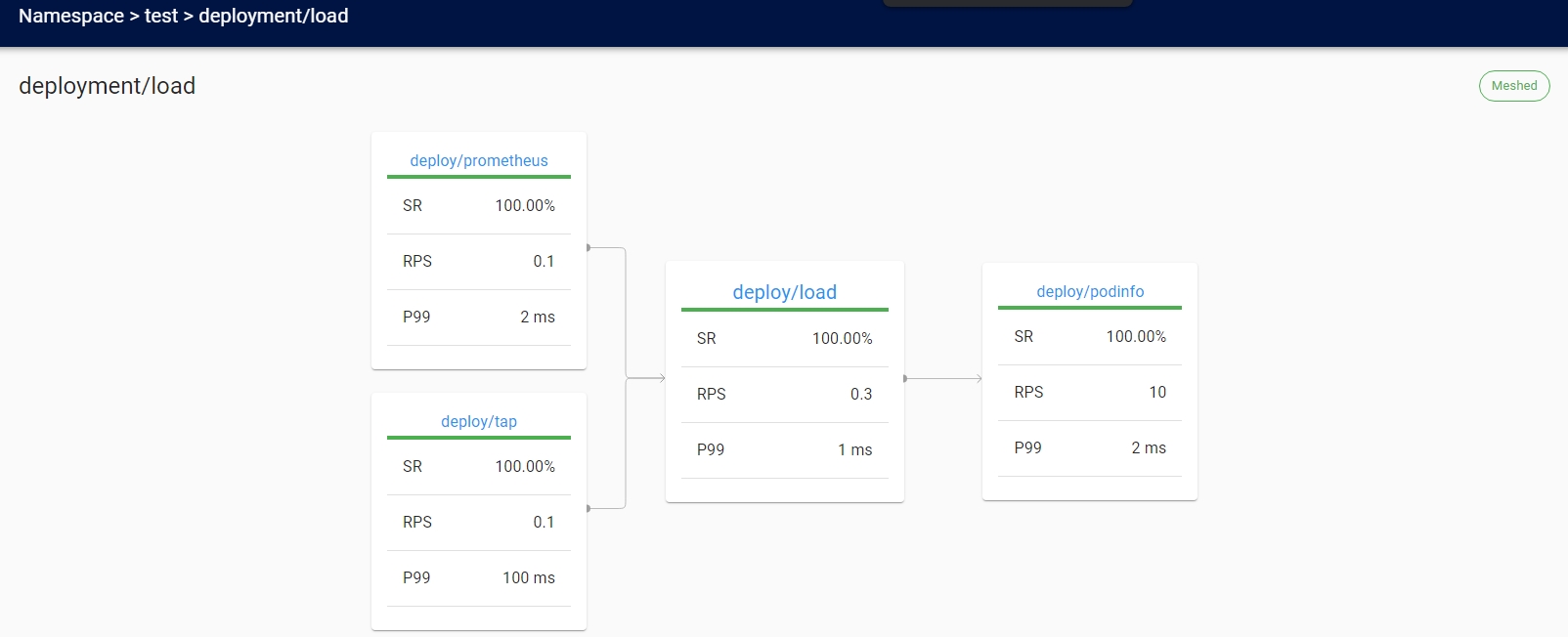
            apiVersion: flagger.app/v1beta1
            kind: Canary
            metadata:
              name: podinfo
              namespace: test
            spec:
              targetRef:
                apiVersion: apps/v1
                kind: Deployment
                name: podinfo
              service:
                port: 9898
              analysis:
                interval: 10s
                threshold: 5
                stepWeight: 10
                maxWeight: 100
                metrics:
                - name: request-success-rate
                  thresholdRange:
                    min: 99
                  interval: 1m
                - name: request-duration
                  thresholdRange:
                    max: 500
                  interval: 1m
- 대시보드
- 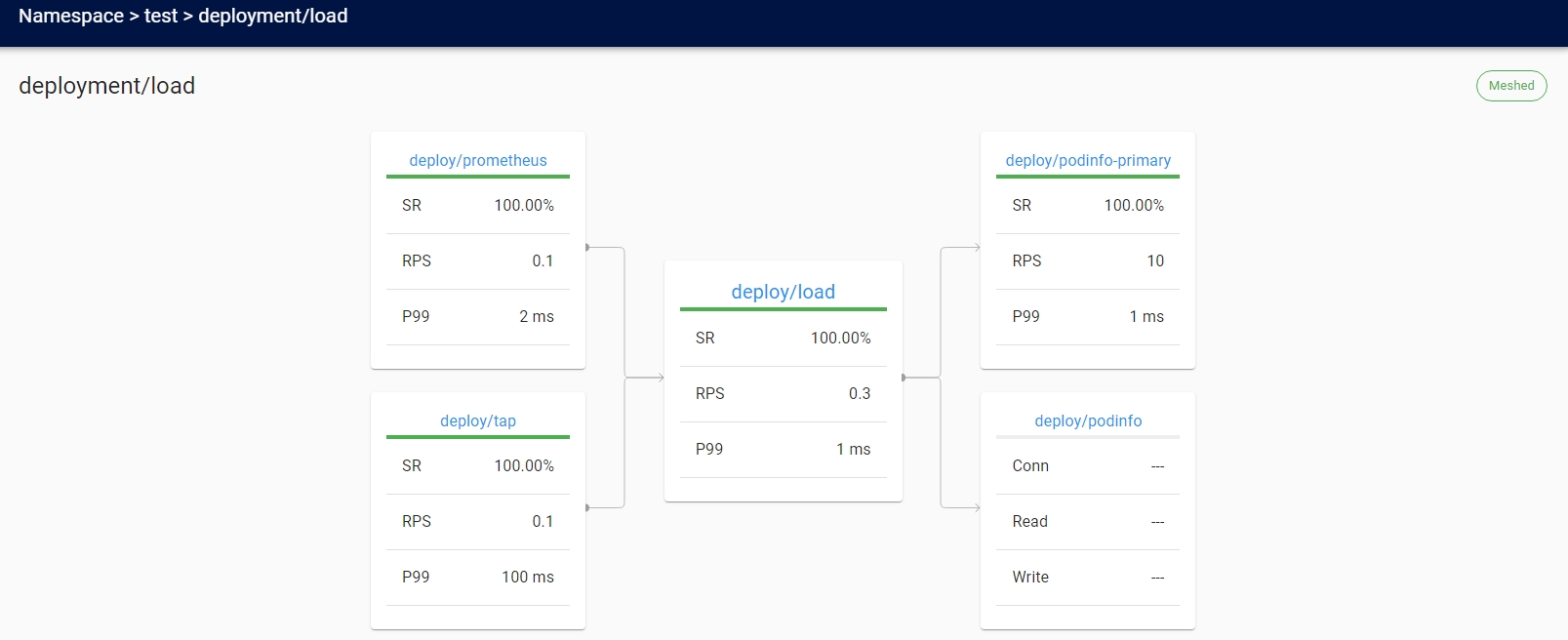{: #magnific}
- {: #magnific}
- 릴리스
- `kubectl -n test set image deployment/podinfo podinfod=quay.io/stefanprodan/podinfo:1.7.1`
- 대시보드
- 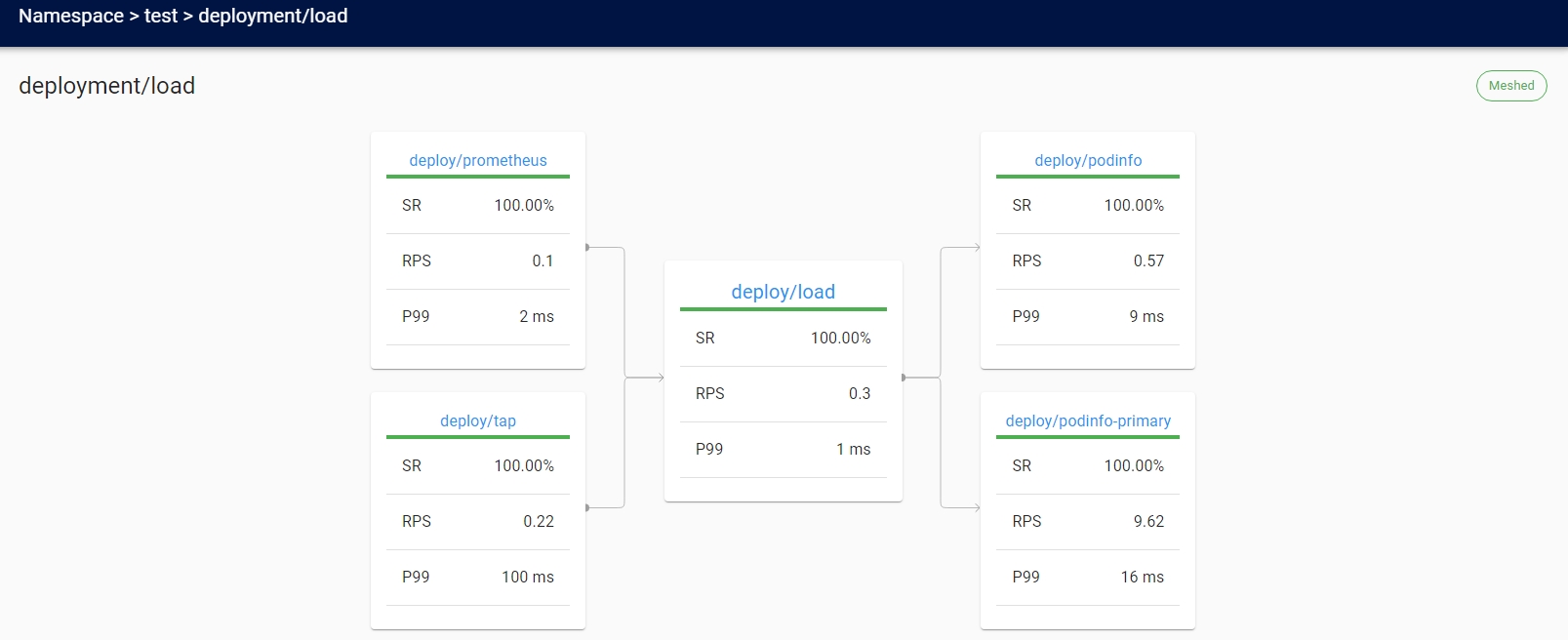{: #magnific}
- 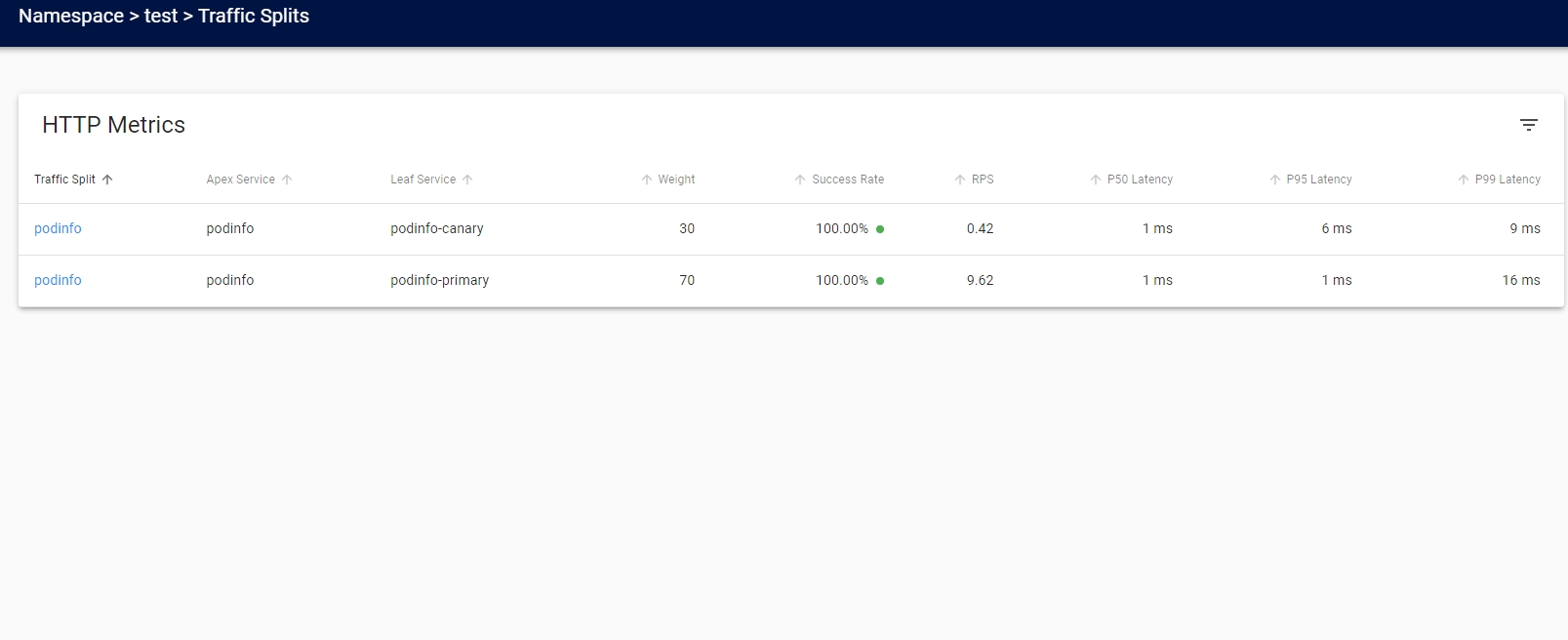{: #magnific}
- 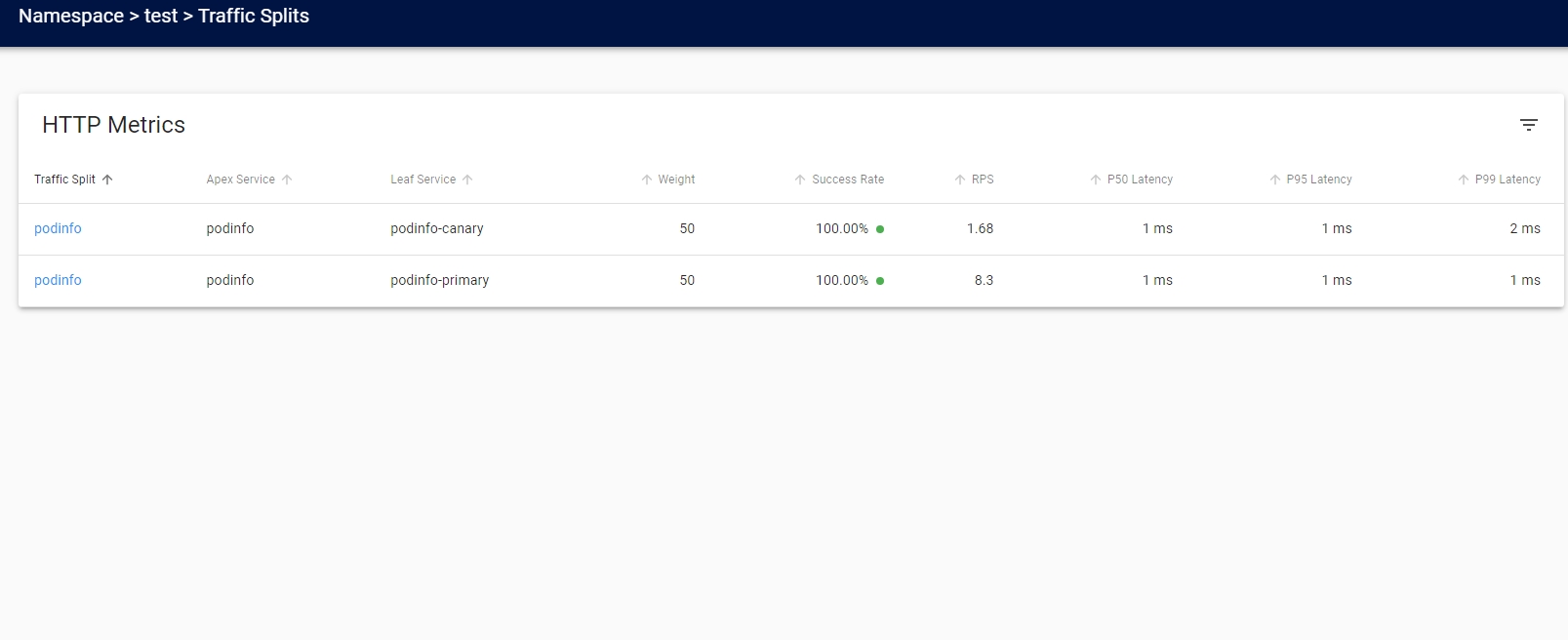{: #magnific}
- 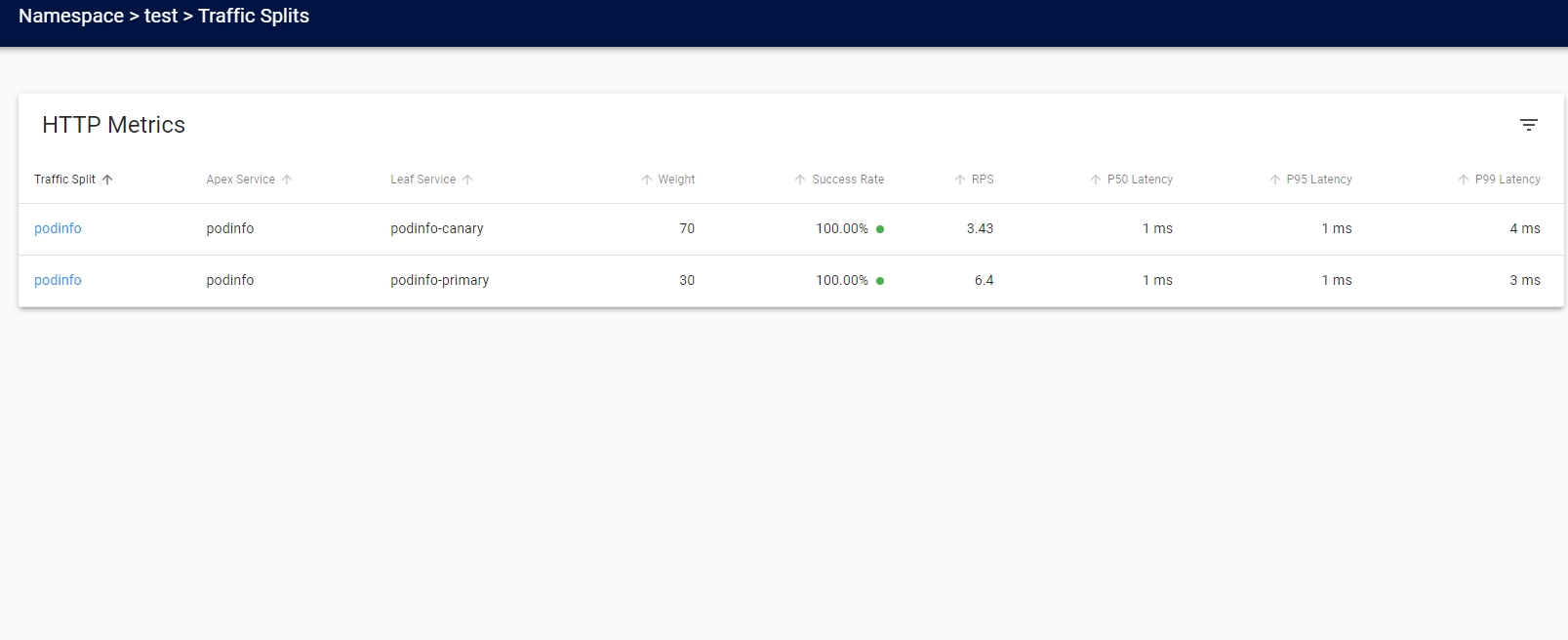{: #magnific}
- 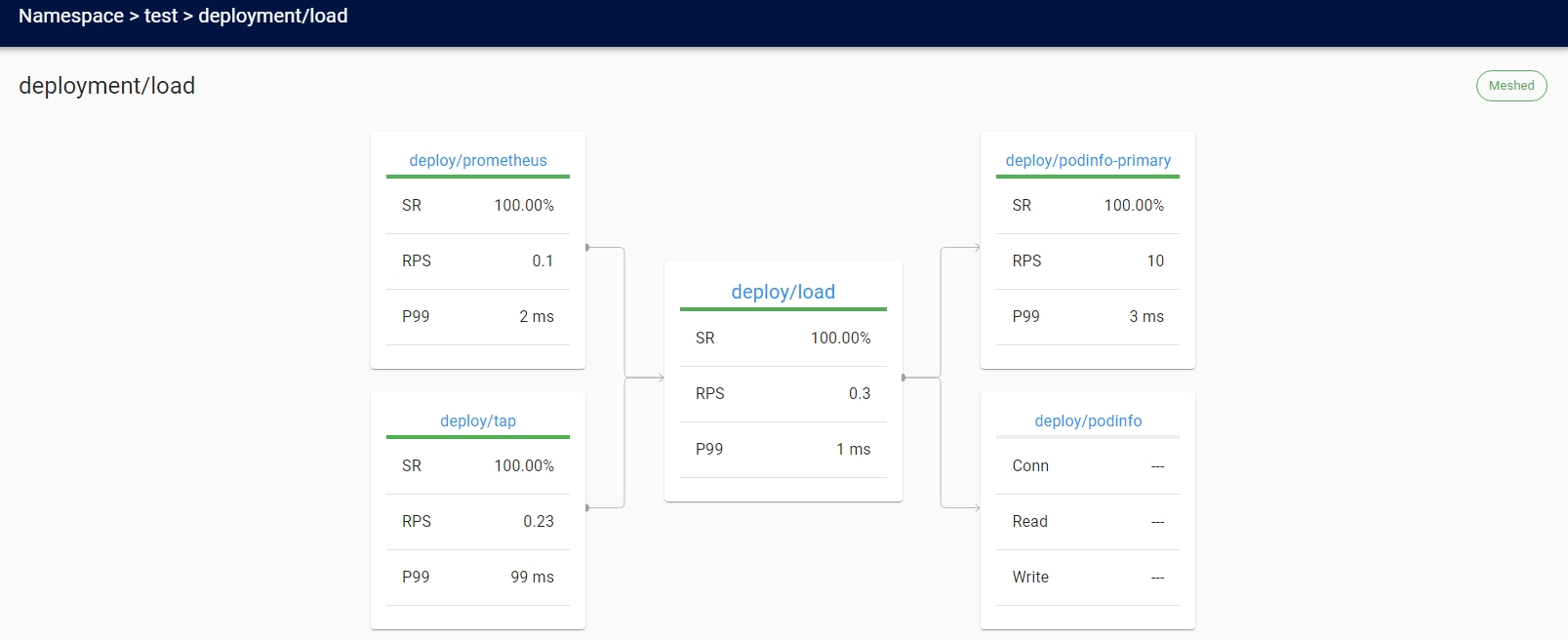{: #magnific}
- 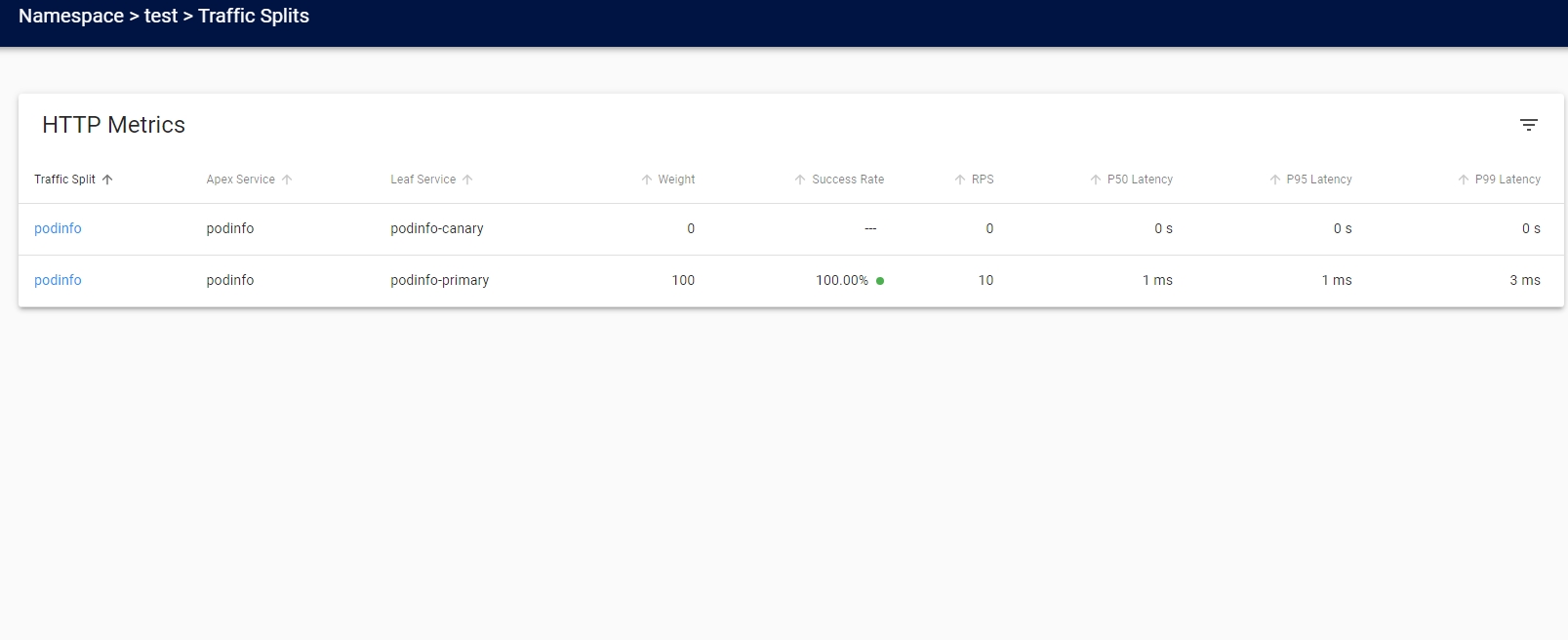{: #magnific}
- 삭제
- `kubectl delete ns test`
- 외부 Prometheus
- Prometheus scrape 설정
          prometheusSpec:
            additionalScrapeConfigs:
            - job_name: 'linkerd-controller'
              scrape_interval: 10s
              kubernetes_sd_configs:
              - role: pod
                namespaces:
                  names:
                  - 'linkerd'
                  - 'linkerd-viz'
              relabel_configs:
              - source_labels:
                - __meta_kubernetes_pod_container_port_name
                action: keep
                regex: admin-http
              - source_labels: [__meta_kubernetes_pod_container_name]
                action: replace
                target_label: component

            - job_name: 'linkerd-service-mirror'
              scrape_interval: 10s
              kubernetes_sd_configs:
              - role: pod
              relabel_configs:
              - source_labels:
                - __meta_kubernetes_pod_label_linkerd_io_control_plane_component
                - __meta_kubernetes_pod_container_port_name
                action: keep
                regex: linkerd-service-mirror;admin-http$
              - source_labels: [__meta_kubernetes_pod_container_name]
                action: replace
                target_label: component

            - job_name: 'linkerd-proxy'
              scrape_interval: 10s
              kubernetes_sd_configs:
              - role: pod
              relabel_configs:
              - source_labels:
                - __meta_kubernetes_pod_container_name
                - __meta_kubernetes_pod_container_port_name
                - __meta_kubernetes_pod_label_linkerd_io_control_plane_ns
                action: keep
                regex: ^;linkerd-admin;linkerd$
              - source_labels: [__meta_kubernetes_namespace]
                action: replace
                target_label: namespace
              - source_labels: [__meta_kubernetes_pod_name]
                action: replace
                target_label: pod
              # special case k8s' "job" label, to not interfere with prometheus' "job"
              # label
              # __meta_kubernetes_pod_label_linkerd_io_proxy_job=foo =>
              # k8s_job=foo
              - source_labels: [__meta_kubernetes_pod_label_linkerd_io_proxy_job]
                action: replace
                target_label: k8s_job
              # drop __meta_kubernetes_pod_label_linkerd_io_proxy_job
              - action: labeldrop
                regex: __meta_kubernetes_pod_label_linkerd_io_proxy_job
              # __meta_kubernetes_pod_label_linkerd_io_proxy_deployment=foo =>
              # deployment=foo
              - action: labelmap
                regex: __meta_kubernetes_pod_label_linkerd_io_proxy_(.+)
              # drop all labels that we just made copies of in the previous labelmap
              - action: labeldrop
                regex: __meta_kubernetes_pod_label_linkerd_io_proxy_(.+)
              # __meta_kubernetes_pod_label_linkerd_io_foo=bar =>
              # foo=bar
              - action: labelmap
                regex: __meta_kubernetes_pod_label_linkerd_io_(.+)
              # Copy all pod labels to tmp labels
              - action: labelmap
                regex: __meta_kubernetes_pod_label_(.+)
                replacement: __tmp_pod_label_$1
              # Take `linkerd_io_` prefixed labels and copy them without the prefix
              - action: labelmap
                regex: __tmp_pod_label_linkerd_io_(.+)
                replacement:  __tmp_pod_label_$1
              # Drop the `linkerd_io_` originals
              - action: labeldrop
                regex: __tmp_pod_label_linkerd_io_(.+)
              # Copy tmp labels into real labels
              - action: labelmap
                regex: __tmp_pod_label_(.+)
- 대시보드 Prometheus url 변경
linkerd viz install --set prometheusUrl=http://kube-prometheus-stack-prometheus.prometheus-stack.svc.cluster.local:9090
- Linkerd Prometheus 비활성화
linkerd viz install --set prometheus.enabled=false
- Grafana Linkerd 대시보드
- 프록시 CPU 코어 수 제어
- proxy-cpu-limit annotation 사용
    kind: Deployment
    apiVersion: apps/v1
    metadata:
    ...
    spec:
      template:
        metadata:
          annotations:
            config.linkerd.io/proxy-cpu-limit: '1'
    ...
- 프록시 로그 레벨 변경
- 프록시 엔드포인트를 통해 즉시 변경
kubectl port-forward ${POD_NAME} linkerd-admincurl -v --data 'linkerd=debug' -X PUT localhost:4191/proxy-log-level
- annotation 추가
config.linkerd.io/proxy-log-level: debug
- 프록시 엔드포인트를 통해 즉시 변경
- 서비스에 대한 액세스 제한
- A 서비스에서만 B 서비스를 호출할 수 있게 설정 가능
- 디버깅
- 예제 애플리케이션
- 설치
kubectl create ns booksapp && curl --proto '=https' --tlsv1.2 -sSfL https://run.linkerd.io/booksapp.yml | kubectl -n booksapp apply -f -
- 데이터 플레인 프록시 추가
kubectl get -n booksapp deploy -o yaml | linkerd inject - | kubectl apply -f -
- 데모 목적으로 트랙픽 생성기가 제공
- 해당 애플리케이션은 책 추가 클릭 시 50%가 실패
- 명확하지 않고 간헐적인 오류의 전형적인 경우임으로 디버깅하기 쉽지 않음
- 쿠버네티스에서는 이 오류를 감지하거나 표시하는 것이 불가능
- 쿠버네티스 관점에서는 정상이나 애플리케이션은 오류를 응답
- 설치
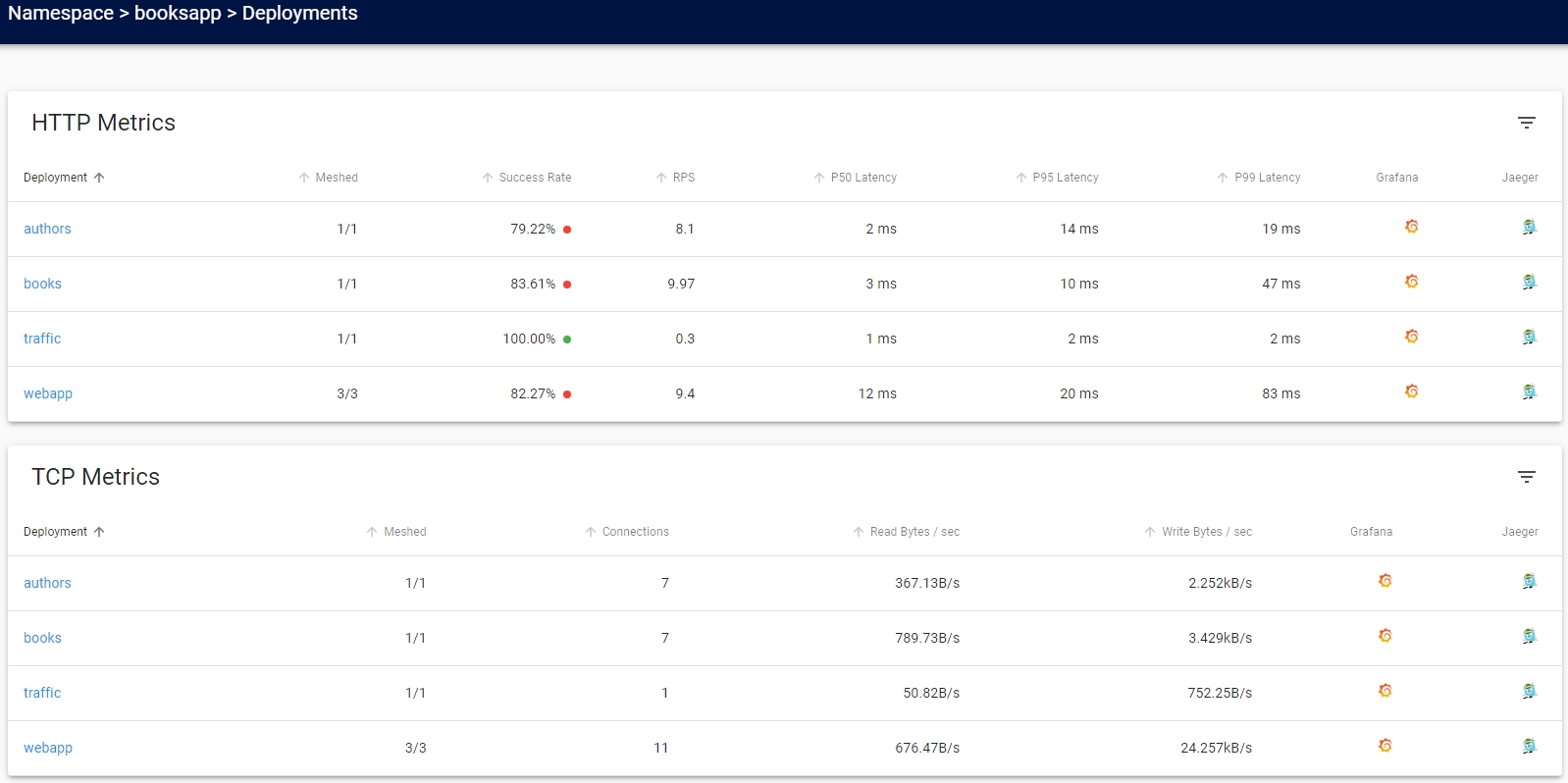
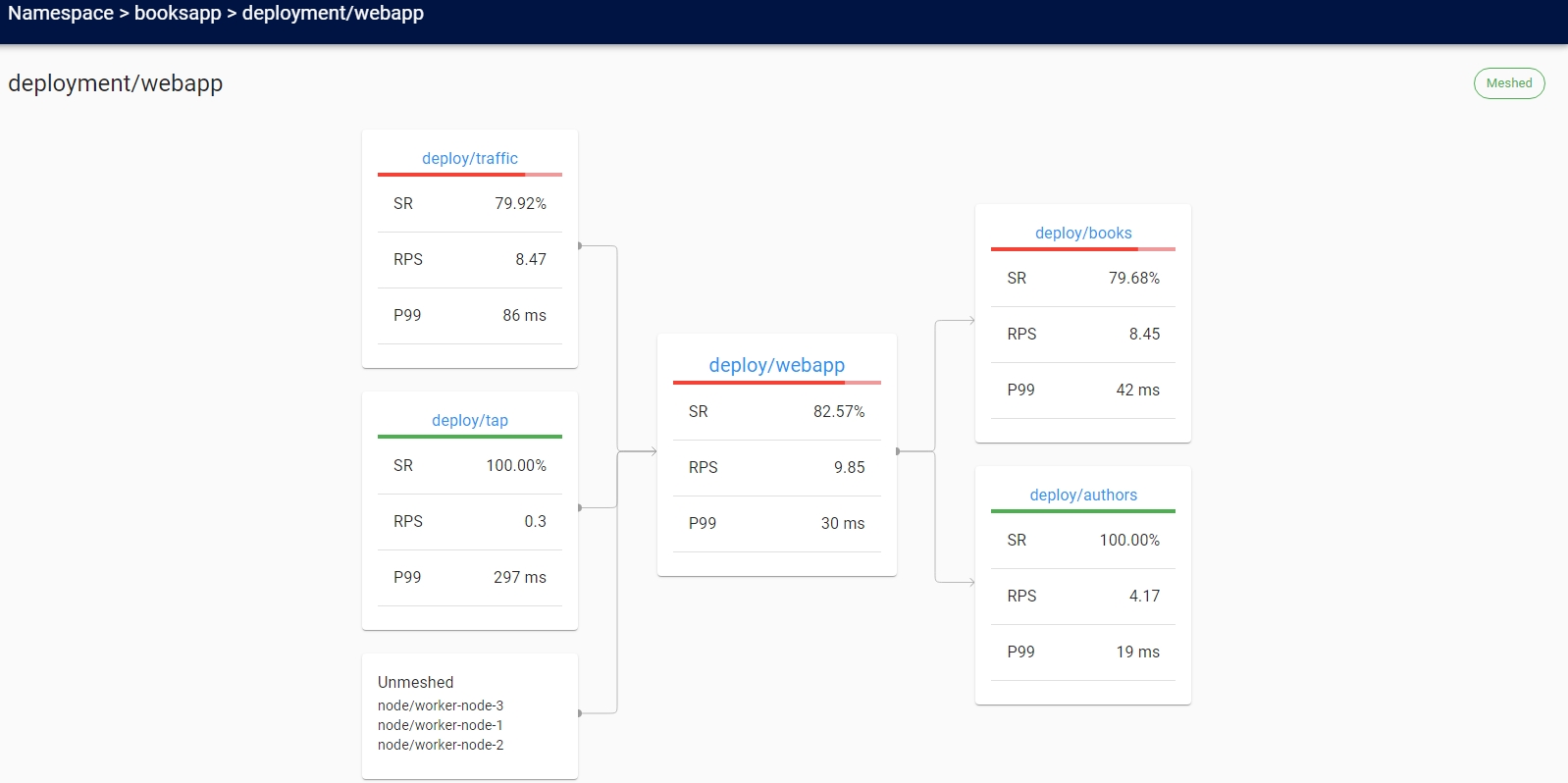
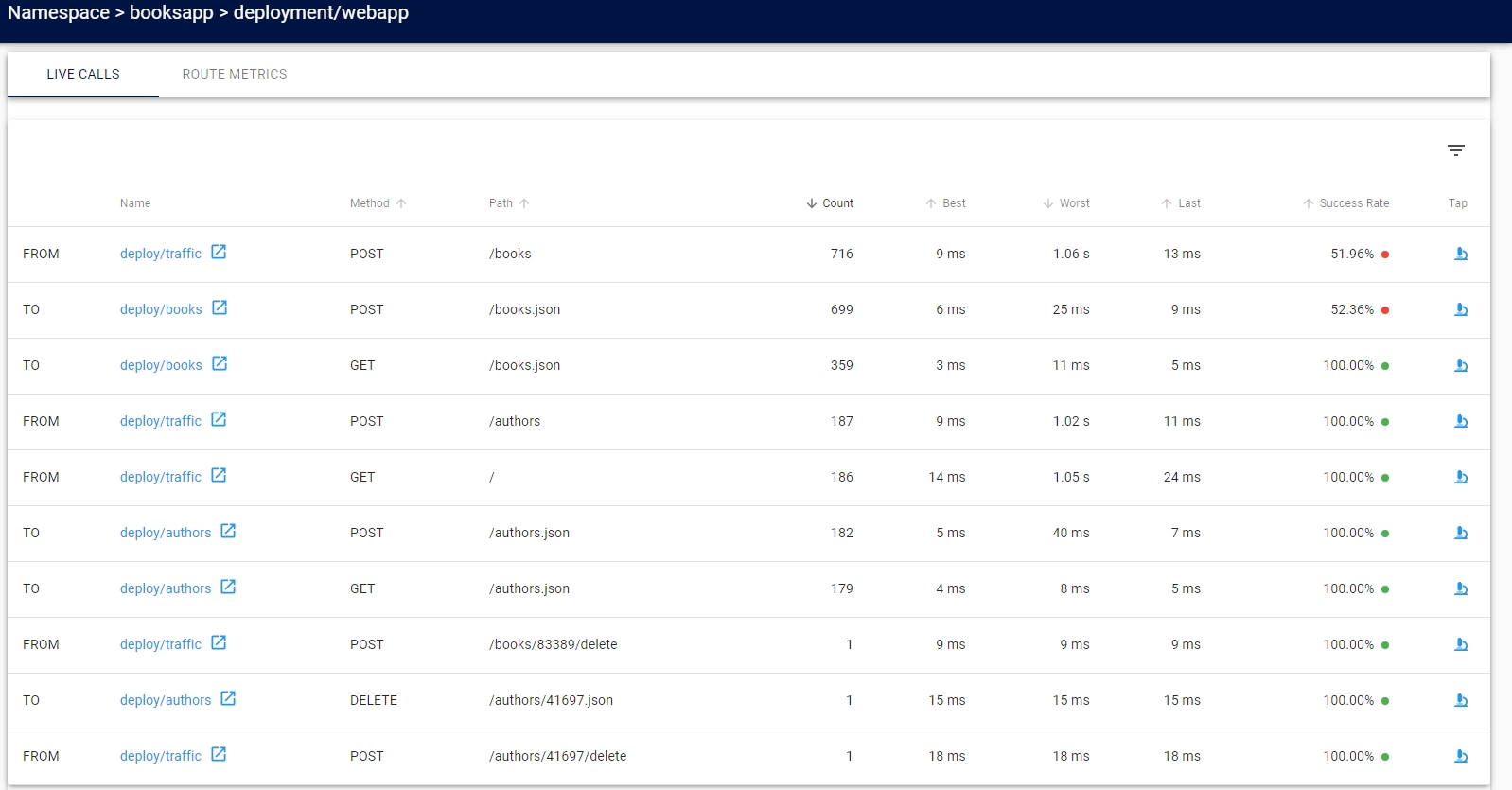
- 대시보드
- 트래픽 생성기에서 책 추가를 하므로 성공률이 100%가 아님
- topology를 통해 문제 구간 확인
- live calls를 통해 실시간 트래픽 확인
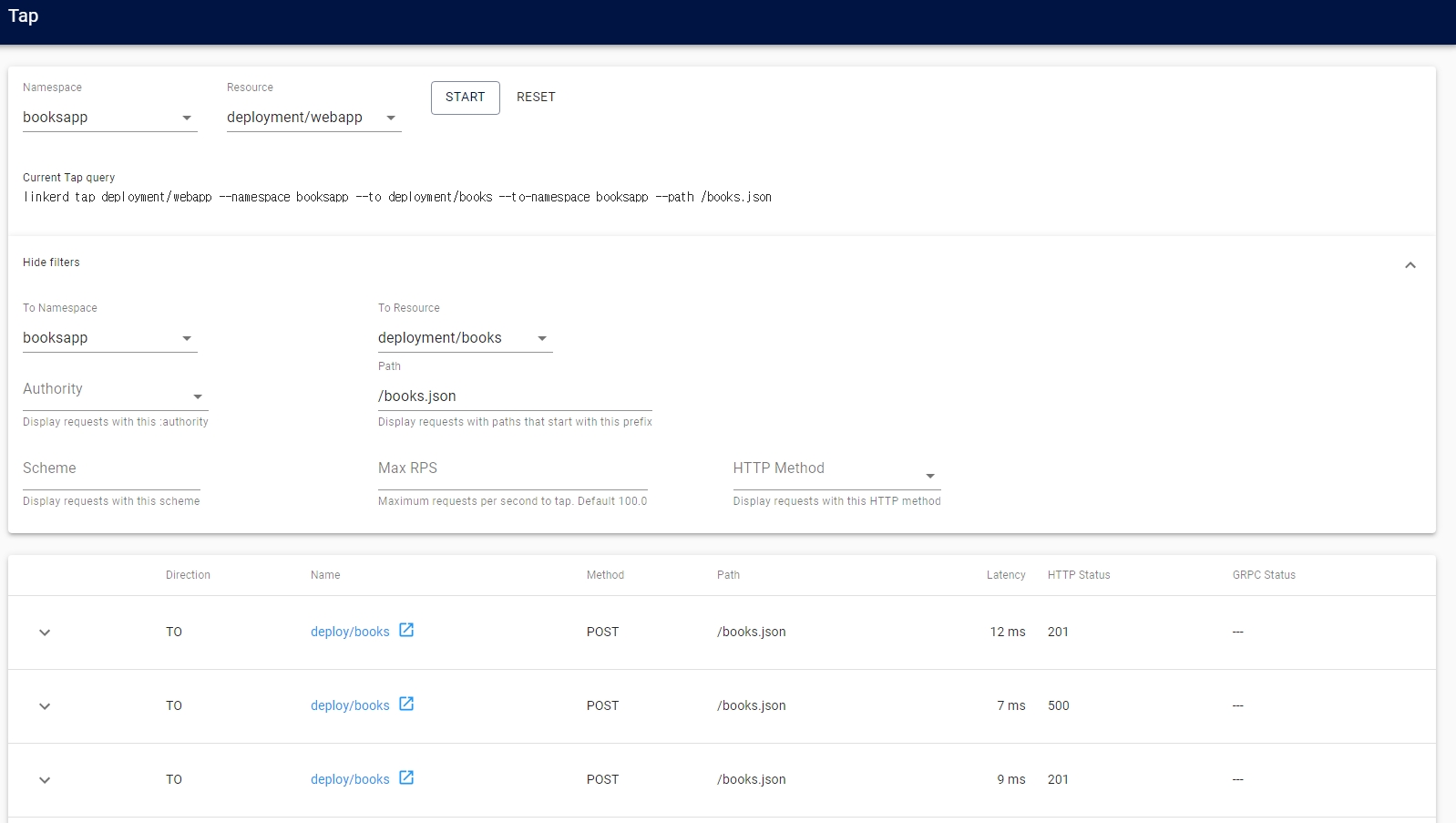
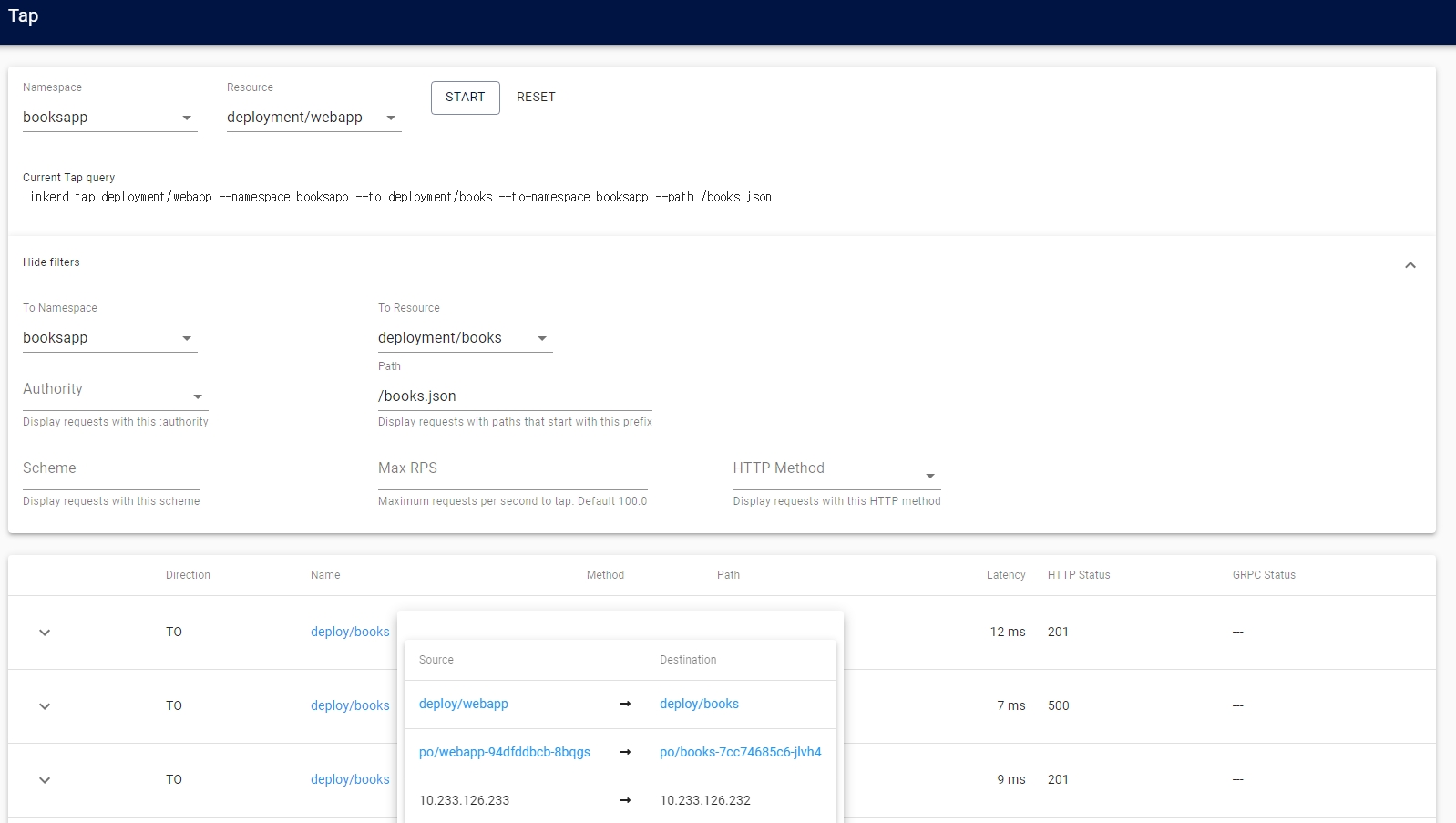
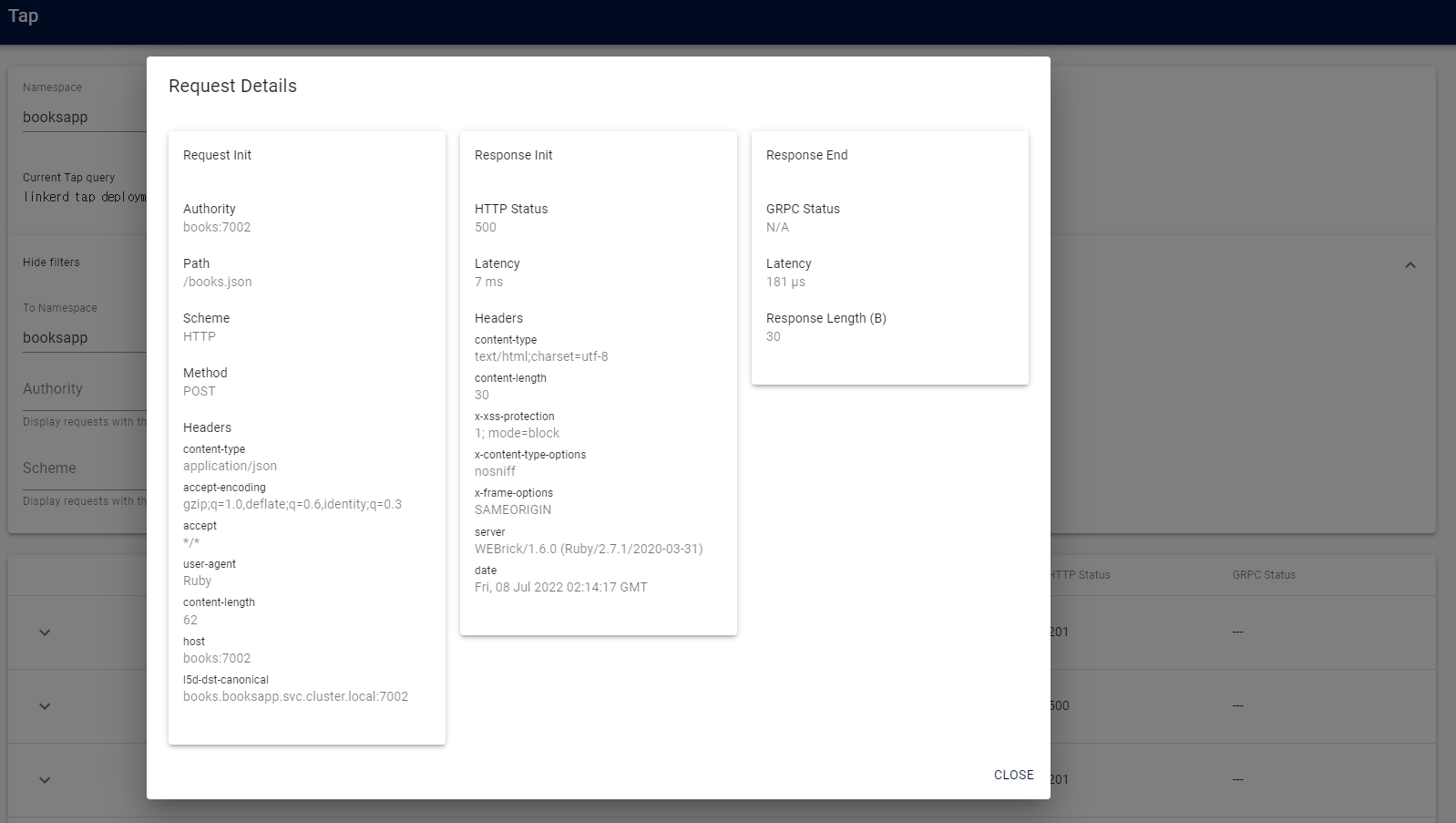
- tap을 통해 상세 정보 확인
- 트래픽 생성기에서 책 추가를 하므로 성공률이 100%가 아님
- 예제 애플리케이션
유사 도구 비교
| 항목 | Linkerd | Istio | Consul Connect |
|---|---|---|---|
| 프록시 | Linkerd2-proxy (Rust, 경량) | Envoy (C++, 기능 풍부) | Envoy |
| 설치 복잡도 | 낮음 | 높음 | 중간 |
| 리소스 사용 | 매우 낮음 | 높음 | 중간 |
| mTLS | 자동 (모든 TCP) | 설정 필요 | 설정 필요 |
| 트래픽 관리 | 기본 (SMI 기반) | 풍부 (VirtualService 등) | 중간 |
| 멀티 클러스터 | 지원 (서비스 미러링) | 지원 (복잡) | 지원 |
| 관찰 가능성 | Golden Metrics 자동화 | 풍부하나 설정 복잡 | 중간 |
| CNCF 성숙도 | Graduated | Graduated | - |
| 적합 용도 | 단순·경량 서비스 메시 | 세밀한 트래픽 제어 필요 시 | Consul 생태계 사용 시 |